
Views: 47
Still sending out CVs and hearing nothing back? You’re not imagining it—there’s a digital gatekeeper between you and your dream job, and it’s called an Applicant Tracking System (ATS).
Studies show that up to 75% of CVs are rejected by ATS systems before reaching a recruiter Harvard Business Review. That means three out of every four applications never even make it to human eyes, regardless of how qualified you are.
The problem isn’t your experience. It’s how your CV communicates that experience to automated screening software.
Here’s the reality in 2026: Three in 10 UK employers are implementing AI into their recruitment processes—often in the form of ATS tools, with the global ATS market forecasted to almost double from US$17.22 billion in 2025 to US$30.51 billion by 2031 Heymilo.
If you’re not optimizing your CV for these systems, you’re essentially applying with a blindfold on, hoping for the best.
But here’s the good news: You can test your CV before employers see it. You can identify exactly what’s blocking your applications. And you can fix these issues systematically with the right ATS CV checker.
Welcome to your complete guide to ATS CV checkers in 2026—and discover why AIRA’s AI-powered screening technology gives you the transparency other tools can’t match.
Resume AI Checker: Understanding the Technology Behind ATS Screening
An ATS CV checker is your secret weapon—a tool that simulates how employers’ Applicant Tracking Systems evaluate your CV, showing you exactly what needs fixing before you apply.
What Is an ATS CV Checker?
An ATS CV checker is a tool that scans your CV to evaluate how well it meets the criteria of applicant tracking systems (ATS), which screen CVs for qualifications, keywords, and traits employers seek Harvard Business Review.
Think of it as a practice test before the real exam. You wouldn’t take a driving test without practicing first—so why send your CV to employers without testing how their screening systems will interpret it?
Resume AI checkers
Resume AI checkers analyze your CV across multiple dimensions:
-
Parsing Capability : The CV checker analyzes formatting, content, keywords, and overall presentation and readability to boost your chances of catching recruiters’ attention PR Newswire.
Modern ATS CV checkers don’t just look at words—they test whether the system can correctly extract your information from your CV format. Complex layouts, tables, or graphics that look impressive to humans often break ATS parsing, causing your skills and experience to be missed entirely.
-
Keyword Matching: The system scans CVs for specific words and phrases that match the job description and ranks and scores them based on how well they match the criteria Harvard Business Review.
But here’s what most job seekers don’t understand: An ATS CV checker scans for key qualifications that hiring systems are programmed to look for, providing data-driven improvement suggestions instead of making you guess what to change Gartner.
-
Structural Compatibility:
Resume AI checkers use standard fonts to ensure some newer fonts don’t convert letters to special characters which often get scanned incorrectly by ATS, and recommend single-column layouts as several ATS fail at reading multi-column CVs correctly Gartner.
-
Content Quality Analysis:
While applicant tracking systems don’t check for typos and badly written content, recruitment managers certainly do—the quality of written content forms a critical part of comprehensive CV scoring Gartner.
Why Traditional CV Writing Isn’t Enough Anymore
In today’s job market, it’s not always human eyes that judge your job application—often, it’s ATS software that accepts or rejects CVs, and if you’ve ever applied for a job and never heard back despite fitting the requirements, ATS could take the blame Psico-smart.
The skills that make you an excellent candidate mean nothing if the ATS can’t properly extract and categorize them from your CV.
Here’s what’s changed in 2026:
-
Semantic analysis
has replaced simple keyword counting
-
AI-powered screening
evaluates context and relevance, not just word matches
-
Predictive algorithms
assess career progression patterns and achievement quantification
-
Bias detection
(when properly implemented) standardizes evaluation criteria
Quality ATS CV checkers use algorithms closely aligned with major ATS software used by recruiters such as Taleo, Workday, and Greenhouse, accurately parsing CVs and delivering meaningful insights about errors and keyword optimization Gartner.
AI Resume Review: What the Best CV Scanners Analyze
ATS CV checkers
Not all ATS CV checkers are created equal. The best tools provide comprehensive analysis across multiple criteria that determine whether your CV passes automated screening.
Comprehensive Scoring Methodology
Enhancv’s CV scoring system is based on two key factors: percentage of parsed content (like an ATS, the clearer the layout and structure, the better it performs), and issues the checker finds including measurable accomplishments and writing caliber Brianheger.
Top-tier resume AI checkers evaluate:
- ATS Compatibility Score (0-100) A good ATS score has to be 80% or higher—this score increases your chances of your CV passing ATS and getting into the hiring manager’s hands Gartner.
An ATS score shows how well your CV matches a job description and passes Applicant Tracking Systems, with scores typically broken into bands: 85-100 (Excellent), 70-84 (Good), 50-69 (Fair), and below 50 (Needs Work) Fair Play Talks.
- Keyword Optimization Analysis To show both hiring managers and an ATS that your skills and experience match the specific role advertised, you need to center your wording around the job description, identifying keywords and phrases that match words used in the job description as closely as possible Heymilo.
The most effective AI resume review tools extract keywords from your target job description and show you:
- ✅ Keywords successfully included in your CV
- ❌ Critical terms you’re missing
- ⚠️ Keyword density recommendations (neither too sparse nor stuffed)
- Formatting and Structure Evaluation ATS software needs clean structure to read CVs properly—complex formatting or unusual layouts can break parsing, making you subject to automatic rejection even if highly qualified Gartner.
Common formatting mistakes flagged by AI resume reviewers:
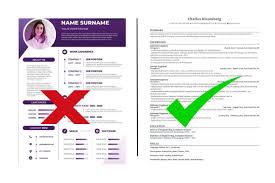
❌ Contact details in headers/footers (ATS frequently fails to read these) ❌ Multi-column layouts that confuse parsing algorithms ❌ Tables and text boxes (rarely parsed correctly) ❌ Graphics, photos, logos, charts (cannot be read by most ATS) ❌ Unusual fonts or special characters ❌ Non-standard section headers
✅ Best practices for ATS-friendly formatting:
- Use standard headers: “Work Experience,” “Education,” “Skills”
- Single-column, left-aligned layout
- Common fonts (Arial, Calibri, Times New Roman, Georgia)
- Simple bullet points (not decorative symbols)
- .docx or PDF format (check job posting for specific requirements)
- Content Quality Assessment Strong CVs tell a clear story—not just what you did, but why it mattered, with numbers providing proof that makes contributions compelling Gartner.
AI resume review
Premium AI resume review tools analyze:
- Use of strong action verbs vs. passive language
- Quantifiable achievements vs. vague responsibilities
- Specificity and measurability of accomplishments
- Professional tone and vocabulary
- Completeness Check The CV checker ensures your CV includes all key contact details in the right places so recruiters can reach out, and verifies all essential sections are complete PR Newswire.
Essential CV sections verified:
- Contact Information (name, location, phone, email, LinkedIn)
- Professional Summary/Personal Statement
- Work Experience with dates and achievements
- Education and qualifications
- Relevant skills for target role
- Certifications (if applicable)
Job-Specific vs. Generic Analysis
Jobscan uploads your CV and copy-pastes a job listing you’re applying for, then analyzes your CV for formatting errors, key qualifications, hard skills, best practices, word count, tone, and more, showing your match rate to see how closely your CV matches the specific job Gartner.
The critical distinction:
Generic CV checkers evaluate general ATS compatibility—useful for baseline assessment
Job-specific checkers compare your CV against a particular job description—essential for targeted optimization
KudosWall’s ATS CV Checker provides job-specific analysis reports that analyze how well your CV matches any job description, with AI improvement tips to fix formatting, highlight missing skills, and ensure ATS-friendliness Fair Play Talks.
CV Scanner: How AIRA’s Multi-Agent AI Delivers Transparent Results
ATS CV checkers
While many ATS CV checkers provide scores and generic recommendations, most operate as black boxes. You get a number—60%, 75%, 82%—but limited explanation of WHY you scored that way or HOW the system reached its conclusions.
This opacity creates frustration and inefficiency. How can you systematically improve what you don’t fully understand?
The Transparency Problem in CV Scanning
Bear in mind, there’s no such thing as a genuine “ATS score”—any online tool claiming to provide one isn’t showing you an actual ATS measure, but rather an estimation based on parsing and compatibility factors Brianheger.
Traditional CV scanners tell you:
- ❌ “Your score is 68%”
- ❌ “Add more keywords”
- ❌ “Improve formatting”
- ❌ “Missing key skills”
But they don’t explain:
- ❓ WHY those specific keywords matter more than others
- ❓ WHICH formatting elements broke the parsing
- ❓ HOW your experience aligns (or doesn’t) with role requirements
- ❓ WHAT concrete changes would have the biggest score impact
Enter AIRA: The CV Scanner Built on AI-Reasoning
AIRA by EDLIGO represents a fundamentally different approach to CV scanning—one built on complete transparency and explainability rather than opaque scoring.
AIRA’s 5 Specialized AI Agents work together to provide the most comprehensive, understandable CV analysis available:
? AI-Résumé Analyzer Agent: The Smart CV Scanner
Goes far beyond traditional parsing to analyze and automatically summarize CVs, extracting:
- Skills and competencies (both explicit and contextual)
- Certifications and qualifications
- Languages and proficiency levels
- Hidden competencies that keyword-based scanners miss
Unlike basic ATS CV checkers that just flag issues, AIRA provides personalized, recruiter-approved suggestions to ensure your CV passes ATS screenings and makes it into the hands of hiring managers Harvard Business Review.
What makes AIRA’s CV scanner different:
Unlike basic parsers that simply categorize information, AIRA’s AI understands context. If you describe “leading cross-functional initiatives,” the system recognizes this demonstrates project management, leadership, stakeholder coordination, and communication skills—even if you didn’t explicitly list those terms.
? AI-Job Matching Agent: The Game-Changing Differentiator ⭐
This is where AIRA transforms from a CV scanner into a career acceleration tool.
Standard ATS CV checkers: Provide a 0-100 score
AIRA’s AI-Job Matching Agent: Provides a score PLUS complete AI-Reasoning that explains:
✅ Exactly which qualifications aligned with job requirements ✅ Specific gaps between your profile and role expectations ✅ Why certain skills were weighted more heavily ✅ How your experience compares to what employers seek ✅ Which improvements would have the greatest impact on your match score
What this means for job seekers:
Instead of guessing why you scored 72% and vaguely trying to “add keywords,” you receive concrete, actionable intelligence:
“Your project management experience strongly aligns with requirements (scored 92%), but the job description emphasizes Agile methodology (mentioned 5 times) which doesn’t appear in your CV. Adding context about your sprint-based delivery approach would increase your overall match from 72% to 84%.”
This level of transparency transforms every AI resume review from a frustrating score into a strategic improvement roadmap.
? AI-Interview Guide Agent: Preparation Beyond the CV
Once your CV passes screening, AIRA generates personalized interview guides with:
- Tailored questions based on your background and the role
- Model answers demonstrating how to frame your experience
- Areas where interviewers will likely probe deeper
✍️ AI-Job Description Generator & Analyzer: Understanding What Employers Want
For job seekers, the Job Description Analyzer helps you decode what employers are really looking for:
- Extracts must-have vs. nice-to-have qualifications
- Identifies hidden requirements in job posting language
- Highlights keywords and terminology to prioritize
Why AIRA’s Approach Matters: Real Transparency
The AIRA Advantage:
❌ Black Box CV Scanners:
- Score: 68%
- Recommendation: “Add more keywords”
- Next steps: Guess which keywords matter most
✅ AIRA’s AI-Reasoning:
- Score: 68%
- Detailed breakdown: Skills match (82%), Experience relevance (71%), Keyword coverage (54%)
- Specific gaps: “Job requires ‘Python data analysis’—you have Python experience but didn’t contextualize it for data analysis. Add 2-3 bullet points describing analysis projects.”
- Predicted impact: “Adding Python data context would increase score to 79%”
- Next steps: Clear, prioritized action items
EDLIGO’s AIRA platform uses AI to map skills according to standardized benchmarks (ESCO, O*NET), identifies gaps with job requirements, and provides customized optimization paths—moving beyond vague CV scanning to strategic, data-driven career acceleration Gartner.
No Setup. Try or Buy. Instant Results.
Unlike enterprise ATS tools requiring technical integration, AIRA works immediately:
- Upload your CV (PDF or DOCX format)
- Paste the job description for your target role
- Receive comprehensive analysis in under 2 minutes
- Review AI-Reasoning report with transparent scoring breakdown
- Implement strategic improvements based on concrete data
- Re-scan and iterate until you achieve 80%+ match scores
Modular and Accessible:
- Pay only for the agents you need
- No complex integrations or IT requirements
- Works for individual job seekers and HR professionals
- Scales from single CV analysis to enterprise talent management
Built by Award-Winning Experts
EDLIGO’s Authority in AI-Powered Talent Analytics:
- 11 years of experience in AI and talent technology
- Top 3 Most Innovative SMEs in Germany (2023)
- Recognized by Brandon Hall Group for commitment to AI-powered talent analytics combining cutting-edge technology with human expertise
- Operating across 20+ countries with measurable client outcomes
Try AIRA’s Free CV Analysis Now to see exactly how ATS systems interpret your qualifications, with complete AI-Reasoning explaining every aspect of your score.
AI Resume Checker: Best Practices for CV Optimization in 2026
AI resume checkers
Now that you understand what AI resume checkers evaluate, here’s how to systematically optimize your CV for maximum ATS compatibility and human impact.
-
Start With Job-Specific Customization
Never place your contact details in the header or footer—ATS CV checker tools frequently fail to read information stored in these areas; instead, place contact information at the top of the page within the main body Paradox.
Generic CVs fail modern ATS screening. Every application should be customized for the specific role based on the job description.
Strategic customization process:
- Upload your master CV to an AI resume checker like AIRA
- Add the complete job description for your target role
- Review the AI-Reasoning report showing keyword gaps and alignment scores
- Adjust emphasis (not fabricate experience) to highlight most relevant qualifications
- Re-scan to verify improvements raised your match score
Critical distinction: This isn’t about lying or inventing skills—it’s about strategically presenting genuine qualifications using terminology that aligns with what employers seek.
-
Balance Keyword Optimization With Natural Language
Using only one version of a skill (e.g., “SEO” but not “Search Engine Optimisation”) limits ATS matching; include both acronyms and full terms to improve ATS compatibility score significantly Paradox.
Bad approach (keyword stuffing): “Experienced in project management, project planning, project coordination, project delivery, project leadership, project execution…”
Good approach (strategic terminology): “Led end-to-end project delivery for enterprise software implementations, managing cross-functional teams of 8-12 members across planning, execution, and deployment phases using Agile methodologies (Scrum, Kanban).”
-
Use ATS-Friendly Formatting Standards
Keep formatting simple—a widely used, easily read font is best with Arial and Times New Roman as safe options, avoiding more obscure fonts or symbols that could throw off ATS, and using traditional subheadings like “Experience,” “Education,” or “Skills” which most ATS tools are trained to scan for Heymilo.
ATS-Optimized Formatting Checklist:
✅ Contact Information:
- Full name, location (city/country), phone, email, LinkedIn
- Placed at top of page in main body (NOT in header/footer)
- Contact section should list name, location, and at least two contact methods to avoid immediate ATS filtering Paradox
✅ Section Headers:
- Use standard, recognizable headers
- “Work Experience” not “My Professional Journey”
- “Education” not “Academic Background”
- “Skills” not “Core Competencies” (though this is borderline acceptable)
✅ Layout Structure:
- Single-column, left-aligned format
- No tables, text boxes, or multi-column grids
- Clear visual hierarchy with consistent spacing
- Simple bullet points (• not ✓ or custom symbols)
✅ Font and Typography:
- Standard fonts: Arial, Calibri, Times New Roman, Georgia
- 10-12pt for body text, 14-16pt for headers
- No decorative fonts or special characters
- Use a widely recognized font for both titles and body text so employer ATS can easily analyze your CV Harvard Business Review
✅ File Format:
- Always upload your CV in the file format specified by the employer; if no request is made, uploading as either a Word document or PDF is usually safest, with the former making it easier for ATS to scan providing it doesn’t include tables or graphs Heymilo
- Saving your CV as PDF from a professional builder like Enhancv is more reliable than Word or DOC files as it preserves formatting Brianheger
- Quantify Every Achievement
Numbers stand out to both ATS algorithms and human eyes: “Increased sales by 42%” beats “Increased sales significantly” Paradox.
Transformation examples:
Vague: “Responsible for managing marketing campaigns”
Quantified: “Spearheaded 12 digital marketing campaigns generating 340,000 qualified leads and £4.7M in attributed revenue, achieving 30% increase in brand visibility within six months”
Vague: “Improved team performance”
Quantified: “Increased team productivity by 35% through implementation of Agile workflows, reducing sprint delivery time from 3 weeks to 2 weeks while maintaining 98% quality standards”
Vague: “Handled customer service inquiries”
Quantified: “Resolved 150+ customer inquiries daily with 96% satisfaction rating, earning ‘Customer Champion’ recognition 3 consecutive quarters”
-
Mirror Job Description Language (Authentically)
Applying for a job requiring ‘customer sales experience’? If your CV cites ‘retail experience’, an ATS may not push you through to the next round—make sure you’re using the same terminology as the job description without bending the truth Heymilo.
Strategic terminology matching:
Job Description Says: “Experience with cloud infrastructure management using AWS, Azure, or GCP”
Your CV Should Say: “Managed cloud infrastructure on AWS and Azure, deploying 50+ production applications with 99.97% uptime”
Not: “Worked with various cloud platforms” (too vague)
Job Description Says: “Proven stakeholder management across technical and non-technical audiences”
Your CV Should Say: “Led stakeholder alignment across engineering, marketing, and C-suite executives for £5M product launch, translating technical requirements into business value propositions”
Not: “Good communication skills” (generic and unsubstantiated)
-
Test, Iterate, and Re-Test
Tip: tailor for each job; small keyword tweaks can lift your band quickly—apply fixes and re-scan until you reach 85+ scores for optimal performance Fair Play Talks.
The optimization cycle:
- Initial scan: Upload CV to AI resume checker, receive baseline score
- Analyze feedback: Review detailed AI-Reasoning (with AIRA) or generic recommendations (with basic tools)
- Prioritize improvements: Focus on high-impact changes first (critical keyword gaps, formatting issues)
- Implement changes: Update CV systematically
- Re-scan: Test updated version to verify improvements
- Iterate: Continue refining until achieving 80%+ match scores
- Job-specific customization: Repeat for each target role
Candidates achieving 90% or higher on resume checkers see their chances of landing interviews double compared to those scoring below 70% Second Talent.
-
Don’t Neglect Human Readability
An ATS-optimised CV ensures your credentials are reviewed by a human recruiter, giving you a real chance to compete—without strategic keywords or correct format, your CV could be discarded before anyone reads it Psico-smart.
Remember: ATS gets you past the digital gatekeeper, but humans make hiring decisions.
Your CV must:
- ✅ Pass ATS screening (get you in the door)
- ✅ Engage human recruiters (earn you the interview)
- ✅ Provide interview talking points (help you perform well)
Making an ATS-friendly document doesn’t mean creating robotic content—find the balance between ATS optimization and compelling human narrative Paradox.
Common ATS CV Checker Mistakes to Avoid
Mistake 1: Testing Once and Assuming You’re Done
Many job seekers run their CV through a CV scanner, make superficial changes, and consider the work complete.
The reality: As you make changes in tools like Jobscan, you’ll see your match rate improve in real-time, requiring iterative optimization rather than one-time fixes Gartner.
Optimization is an ongoing process, especially when targeting different roles or industries.
Mistake 2: Focusing Only on Score, Ignoring Specific Feedback
The best tools offer intuitive dashboards with actionable suggestions rather than just pass/fail outcomes—ease of uploading CVs, visual reports, and clear feedback are essential Gartner.
A 75% score tells you where you stand. The detailed feedback tells you how to improve.
With basic CV scanners: You get a number and vague advice With AIRA’s AI-Reasoning: You get specific, prioritized action items with predicted impact
Mistake 3: Optimizing for ATS But Losing Human Appeal
Crafting a CV by simply listing keywords without demonstrating their application flags you as potentially unqualified to human recruiters Paradox.
Your CV needs to work on two levels:
- Technical (passes ATS parsing and matching)
- Narrative (engages human readers)
Mistake 4: Using Outdated or Overly Designed Templates
Photos, logos, charts, and infographics cannot be read by most ATS CV checker systems—the ATS parser simply skips these elements, meaning your CV should be text-based Paradox.
Many free CV templates prioritize visual appeal over ATS compatibility, causing qualified candidates to be filtered out.
When choosing a CV template, consider company culture—for more formal companies, keep design simple and direct, using templates specifically designed for ATS analysis Harvard Business Review.
Mistake 5: Not Testing Against Actual Job Descriptions
Job seekers who are failing to optimize their CVs for ATS systems may increasingly struggle to secure interviews, as 75% of qualified candidates who fail ATS scans could pass with proper optimization Heymilo.
Generic CV optimization helps establish a baseline, but job-specific analysis reveals whether your CV actually matches the roles you’re targeting.
How to Choose the Right ATS CV Checker for Your Needs
Essential Features to Look For
When choosing your ATS CV checking tool in 2026, look for algorithms closely aligned with major ATS software used by recruiters, accurate parsing that delivers meaningful insights about errors and keyword optimization, and intuitive dashboards with actionable suggestions Gartner.
Minimum requirements for quality ATS CV checkers:
✅ Accurate Parsing: Tests whether ATS can extract your information correctly ✅ Keyword Analysis: Compares your CV against job descriptions to identify gaps ✅ Formatting Feedback: Flags elements that break ATS compatibility ✅ Scoring Methodology: Provides clear explanation of how scores are calculated ✅ Improvement Suggestions: Offers concrete, actionable recommendations ✅ Multiple Format Support: Accepts PDF, DOCX, and other standard formats
Premium features that maximize value:
⭐ Job-Specific Analysis: Customizes evaluation based on target role ⭐ AI-Reasoning/Transparency: Explains WHY you received your score ⭐ Iterative Testing: Allows unlimited re-scans to track improvement ⭐ Industry-Specific Guidance: Tailors feedback to your field ⭐ Human Readability Assessment: Balances ATS optimization with narrative quality
Why AIRA Stands Out Among ATS CV Checkers
Comparison: Standard CV Scanners vs. AIRA
|
Feature |
Basic ATS CV Checkers |
AIRA by EDLIGO |
|
Parsing Analysis |
Basic keyword extraction |
Advanced semantic understanding + context |
|
Scoring |
0-100 number |
Score + complete AI-Reasoning breakdown |
|
Feedback |
Generic suggestions |
Specific, prioritized action items |
|
Transparency |
“Black box” scoring |
Full explanation of every criterion |
|
Job Matching |
Simple keyword comparison |
Sophisticated alignment analysis |
|
Setup Required |
Usually account creation |
No setup—instant results |
|
Iteration Support |
Limited free scans |
Unlimited optimization cycles |
|
Skills Mapping |
Basic categorization |
ESCO/O*NET standardized frameworks |
|
Interview Prep |
Not included |
Personalized interview guide generation |
The AIRA Difference:
Most ATS CV checkers tell you WHAT to fix. AIRA tells you WHY it matters, HOW to fix it, and WHAT impact the changes will have.
This transparency transforms CV optimization from guesswork into strategic career acceleration.
Conclusion: Stop Guessing, Start Knowing
Up to 75% of CVs are rejected by ATS systems before reaching a recruiter Harvard Business Review. But this statistic isn’t your destiny—it’s a solvable problem.
The key insights to remember:
✅ ATS CV checkers simulate how employer screening systems evaluate your CV ✅ AI resume review provides actionable feedback on formatting, keywords, and content ✅ CV scanners with AI-Reasoning (like AIRA) offer transparency other tools can’t match ✅ Optimization is iterative—test, improve, re-test until you achieve 80%+ scores ✅ Balance is essential—your CV must pass ATS AND engage human recruiters
The job market in 2026 demands strategic preparation. You’re competing not just against other candidates, but against automated screening systems designed to filter out the majority of applicants.
But here’s the opportunity: most job seekers don’t optimize their CVs for ATS. They send generic applications and wonder why they never hear back.
You can be different.
You can test your CV before employers see it. You can identify exactly what’s blocking your applications. You can fix issues systematically with data-driven insights. You can track improvement and optimize until you reach the top scoring bracket.
Try AIRA’s Free CV Analysis to see exactly how ATS systems interpret your qualifications, with complete AI-Reasoning explaining every evaluation criterion and providing specific, prioritized recommendations for improvement.
The difference between 75% rejection rates and interview invitations often comes down to understanding what ATS CV checkers reveal about your application—and AIRA gives you that understanding with unprecedented transparency.
Stop sending CVs blindly. Start with data. Optimize strategically. Land the interviews you deserve.
Related Resources:
- Future-Proof Your CV: Top 5 ATS Optimization Mistakes
- AI in Recruitment Process: Complete Step-by-Step Guide
- Check Resume for ATS: Try Our AI Resume Screening Free