by
Still sending out CVs and hearing nothing back? You’re not imagining it—there’s a digital gatekeeper between you and your dream job, and it’s called an Applicant Tracking System (ATS).
Studies show that up to 75% of CVs are rejected by ATS systems before reaching a recruiter Harvard Business Review. That means three out of every four applications never even make it to human eyes, regardless of how qualified you are.
The problem isn’t your experience. It’s how your CV communicates that experience to automated screening software.
Here’s the reality in 2026: Three in 10 UK employers are implementing AI into their recruitment processes—often in the form of ATS tools, with the global ATS market forecasted to almost double from US$17.22 billion in 2025 to US$30.51 billion by 2031 Heymilo.
If you’re not optimizing your CV for these systems, you’re essentially applying with a blindfold on, hoping for the best.
But here’s the good news: You can test your CV before employers see it. You can identify exactly what’s blocking your applications. And you can fix these issues systematically with the right ATS CV checker.
Welcome to your complete guide to ATS CV checkers in 2026—and discover why AIRA’s AI-powered screening technology gives you the transparency other tools can’t match.
Resume AI Checker: Understanding the Technology Behind ATS Screening
An ATS CV checker is your secret weapon—a tool that simulates how employers’ Applicant Tracking Systems evaluate your CV, showing you exactly what needs fixing before you apply.
What Is an ATS CV Checker?
An ATS CV checker is a tool that scans your CV to evaluate how well it meets the criteria of applicant tracking systems (ATS), which screen CVs for qualifications, keywords, and traits employers seek Harvard Business Review.
Think of it as a practice test before the real exam. You wouldn’t take a driving test without practicing first—so why send your CV to employers without testing how their screening systems will interpret it?
Resume AI checkers
Resume AI checkers analyze your CV across multiple dimensions:
-
Parsing Capability : The CV checker analyzes formatting, content, keywords, and overall presentation and readability to boost your chances of catching recruiters’ attention PR Newswire.
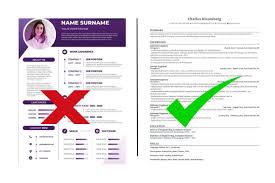
Modern ATS CV checkers don’t just look at words—they test whether the system can correctly extract your information from your CV format. Complex layouts, tables, or graphics that look impressive to humans often break ATS parsing, causing your skills and experience to be missed entirely.
-
Keyword Matching: The system scans CVs for specific words and phrases that match the job description and ranks and scores them based on how well they match the criteria Harvard Business Review.
But here’s what most job seekers don’t understand: An ATS CV checker scans for key qualifications that hiring systems are programmed to look for, providing data-driven improvement suggestions instead of making you guess what to change Gartner.
-
Structural Compatibility:
Resume AI checkers use standard fonts to ensure some newer fonts don’t convert letters to special characters which often get scanned incorrectly by ATS, and recommend single-column layouts as several ATS fail at reading multi-column CVs correctly Gartner.
-
Content Quality Analysis:
While applicant tracking systems don’t check for typos and badly written content, recruitment managers certainly do—the quality of written content forms a critical part of comprehensive CV scoring Gartner.
Why Traditional CV Writing Isn’t Enough Anymore
In today’s job market, it’s not always human eyes that judge your job application—often, it’s ATS software that accepts or rejects CVs, and if you’ve ever applied for a job and never heard back despite fitting the requirements, ATS could take the blame Psico-smart.
The skills that make you an excellent candidate mean nothing if the ATS can’t properly extract and categorize them from your CV.
Here’s what’s changed in 2026:
-
Semantic analysis
has replaced simple keyword counting
-
AI-powered screening
evaluates context and relevance, not just word matches
-
Predictive algorithms
assess career progression patterns and achievement quantification
-
Bias detection
(when properly implemented) standardizes evaluation criteria
Quality ATS CV checkers use algorithms closely aligned with major ATS software used by recruiters such as Taleo, Workday, and Greenhouse, accurately parsing CVs and delivering meaningful insights about errors and keyword optimization Gartner.
AI Resume Review: What the Best CV Scanners Analyze
ATS CV checkers
Not all ATS CV checkers are created equal. The best tools provide comprehensive analysis across multiple criteria that determine whether your CV passes automated screening.
Comprehensive Scoring Methodology
Enhancv’s CV scoring system is based on two key factors: percentage of parsed content (like an ATS, the clearer the layout and structure, the better it performs), and issues the checker finds including measurable accomplishments and writing caliber Brianheger.
Top-tier resume AI checkers evaluate:
- ATS Compatibility Score (0-100) A good ATS score has to be 80% or higher—this score increases your chances of your CV passing ATS and getting into the hiring manager’s hands Gartner.
An ATS score shows how well your CV matches a job description and passes Applicant Tracking Systems, with scores typically broken into bands: 85-100 (Excellent), 70-84 (Good), 50-69 (Fair), and below 50 (Needs Work) Fair Play Talks.
- Keyword Optimization Analysis To show both hiring managers and an ATS that your skills and experience match the specific role advertised, you need to center your wording around the job description, identifying keywords and phrases that match words used in the job description as closely as possible Heymilo.
The most effective AI resume review tools extract keywords from your target job description and show you:
- ✅ Keywords successfully included in your CV
- ❌ Critical terms you’re missing
- ⚠️ Keyword density recommendations (neither too sparse nor stuffed)
- Formatting and Structure Evaluation ATS software needs clean structure to read CVs properly—complex formatting or unusual layouts can break parsing, making you subject to automatic rejection even if highly qualified Gartner.
Common formatting mistakes flagged by AI resume reviewers:
❌ Contact details in headers/footers (ATS frequently fails to read these) ❌ Multi-column layouts that confuse parsing algorithms ❌ Tables and text boxes (rarely parsed correctly) ❌ Graphics, photos, logos, charts (cannot be read by most ATS) ❌ Unusual fonts or special characters ❌ Non-standard section headers
✅ Best practices for ATS-friendly formatting:
- Use standard headers: “Work Experience,” “Education,” “Skills”
- Single-column, left-aligned layout
- Common fonts (Arial, Calibri, Times New Roman, Georgia)
- Simple bullet points (not decorative symbols)
- .docx or PDF format (check job posting for specific requirements)
- Content Quality Assessment Strong CVs tell a clear story—not just what you did, but why it mattered, with numbers providing proof that makes contributions compelling Gartner.
AI resume review
Premium AI resume review tools analyze:
- Use of strong action verbs vs. passive language
- Quantifiable achievements vs. vague responsibilities
- Specificity and measurability of accomplishments
- Professional tone and vocabulary
- Completeness Check The CV checker ensures your CV includes all key contact details in the right places so recruiters can reach out, and verifies all essential sections are complete PR Newswire.
Essential CV sections verified:
- Contact Information (name, location, phone, email, LinkedIn)
- Professional Summary/Personal Statement
- Work Experience with dates and achievements
- Education and qualifications
- Relevant skills for target role
- Certifications (if applicable)
Job-Specific vs. Generic Analysis
Jobscan uploads your CV and copy-pastes a job listing you’re applying for, then analyzes your CV for formatting errors, key qualifications, hard skills, best practices, word count, tone, and more, showing your match rate to see how closely your CV matches the specific job Gartner.
The critical distinction:
Generic CV checkers evaluate general ATS compatibility—useful for baseline assessment
Job-specific checkers compare your CV against a particular job description—essential for targeted optimization
KudosWall’s ATS CV Checker provides job-specific analysis reports that analyze how well your CV matches any job description, with AI improvement tips to fix formatting, highlight missing skills, and ensure ATS-friendliness Fair Play Talks.
CV Scanner: How AIRA’s Multi-Agent AI Delivers Transparent Results
ATS CV checkers
While many ATS CV checkers provide scores and generic recommendations, most operate as black boxes. You get a number—60%, 75%, 82%—but limited explanation of WHY you scored that way or HOW the system reached its conclusions.
This opacity creates frustration and inefficiency. How can you systematically improve what you don’t fully understand?
The Transparency Problem in CV Scanning
Bear in mind, there’s no such thing as a genuine “ATS score”—any online tool claiming to provide one isn’t showing you an actual ATS measure, but rather an estimation based on parsing and compatibility factors Brianheger.
Traditional CV scanners tell you:
- ❌ “Your score is 68%”
- ❌ “Add more keywords”
- ❌ “Improve formatting”
- ❌ “Missing key skills”
But they don’t explain:
- ❓ WHY those specific keywords matter more than others
- ❓ WHICH formatting elements broke the parsing
- ❓ HOW your experience aligns (or doesn’t) with role requirements
- ❓ WHAT concrete changes would have the biggest score impact
Enter AIRA: The CV Scanner Built on AI-Reasoning
AIRA by EDLIGO represents a fundamentally different approach to CV scanning—one built on complete transparency and explainability rather than opaque scoring.
AIRA’s 5 Specialized AI Agents work together to provide the most comprehensive, understandable CV analysis available:
🤖 AI-Résumé Analyzer Agent: The Smart CV Scanner
Goes far beyond traditional parsing to analyze and automatically summarize CVs, extracting:
- Skills and competencies (both explicit and contextual)
- Certifications and qualifications
- Languages and proficiency levels
- Hidden competencies that keyword-based scanners miss
Unlike basic ATS CV checkers that just flag issues, AIRA provides personalized, recruiter-approved suggestions to ensure your CV passes ATS screenings and makes it into the hands of hiring managers Harvard Business Review.
What makes AIRA’s CV scanner different:
Unlike basic parsers that simply categorize information, AIRA’s AI understands context. If you describe “leading cross-functional initiatives,” the system recognizes this demonstrates project management, leadership, stakeholder coordination, and communication skills—even if you didn’t explicitly list those terms.
🎯 AI-Job Matching Agent: The Game-Changing Differentiator ⭐
This is where AIRA transforms from a CV scanner into a career acceleration tool.
Standard ATS CV checkers: Provide a 0-100 score
AIRA’s AI-Job Matching Agent: Provides a score PLUS complete AI-Reasoning that explains:
✅ Exactly which qualifications aligned with job requirements ✅ Specific gaps between your profile and role expectations ✅ Why certain skills were weighted more heavily ✅ How your experience compares to what employers seek ✅ Which improvements would have the greatest impact on your match score
What this means for job seekers:
Instead of guessing why you scored 72% and vaguely trying to “add keywords,” you receive concrete, actionable intelligence:
“Your project management experience strongly aligns with requirements (scored 92%), but the job description emphasizes Agile methodology (mentioned 5 times) which doesn’t appear in your CV. Adding context about your sprint-based delivery approach would increase your overall match from 72% to 84%.”
This level of transparency transforms every AI resume review from a frustrating score into a strategic improvement roadmap.
📝 AI-Interview Guide Agent: Preparation Beyond the CV
Once your CV passes screening, AIRA generates personalized interview guides with:
- Tailored questions based on your background and the role
- Model answers demonstrating how to frame your experience
- Areas where interviewers will likely probe deeper
✍️ AI-Job Description Generator & Analyzer: Understanding What Employers Want
For job seekers, the Job Description Analyzer helps you decode what employers are really looking for:
- Extracts must-have vs. nice-to-have qualifications
- Identifies hidden requirements in job posting language
- Highlights keywords and terminology to prioritize
Why AIRA’s Approach Matters: Real Transparency
The AIRA Advantage:
❌ Black Box CV Scanners:
- Score: 68%
- Recommendation: “Add more keywords”
- Next steps: Guess which keywords matter most
✅ AIRA’s AI-Reasoning:
- Score: 68%
- Detailed breakdown: Skills match (82%), Experience relevance (71%), Keyword coverage (54%)
- Specific gaps: “Job requires ‘Python data analysis’—you have Python experience but didn’t contextualize it for data analysis. Add 2-3 bullet points describing analysis projects.”
- Predicted impact: “Adding Python data context would increase score to 79%”
- Next steps: Clear, prioritized action items
EDLIGO’s AIRA platform uses AI to map skills according to standardized benchmarks (ESCO, O*NET), identifies gaps with job requirements, and provides customized optimization paths—moving beyond vague CV scanning to strategic, data-driven career acceleration Gartner.
No Setup. Try or Buy. Instant Results.
Unlike enterprise ATS tools requiring technical integration, AIRA works immediately:
- Upload your CV (PDF or DOCX format)
- Paste the job description for your target role
- Receive comprehensive analysis in under 2 minutes
- Review AI-Reasoning report with transparent scoring breakdown
- Implement strategic improvements based on concrete data
- Re-scan and iterate until you achieve 80%+ match scores
Modular and Accessible:
- Pay only for the agents you need
- No complex integrations or IT requirements
- Works for individual job seekers and HR professionals
- Scales from single CV analysis to enterprise talent management
Built by Award-Winning Experts
EDLIGO’s Authority in AI-Powered Talent Analytics:
- 11 years of experience in AI and talent technology
- Top 3 Most Innovative SMEs in Germany (2023)
- Recognized by Brandon Hall Group for commitment to AI-powered talent analytics combining cutting-edge technology with human expertise
- Operating across 20+ countries with measurable client outcomes
Try AIRA’s Free CV Analysis Now to see exactly how ATS systems interpret your qualifications, with complete AI-Reasoning explaining every aspect of your score.
AI Resume Checker: Best Practices for CV Optimization in 2026
AI resume checkers
Now that you understand what AI resume checkers evaluate, here’s how to systematically optimize your CV for maximum ATS compatibility and human impact.
-
Start With Job-Specific Customization
Never place your contact details in the header or footer—ATS CV checker tools frequently fail to read information stored in these areas; instead, place contact information at the top of the page within the main body Paradox.
Generic CVs fail modern ATS screening. Every application should be customized for the specific role based on the job description.
Strategic customization process:
- Upload your master CV to an AI resume checker like AIRA
- Add the complete job description for your target role
- Review the AI-Reasoning report showing keyword gaps and alignment scores
- Adjust emphasis (not fabricate experience) to highlight most relevant qualifications
- Re-scan to verify improvements raised your match score
Critical distinction: This isn’t about lying or inventing skills—it’s about strategically presenting genuine qualifications using terminology that aligns with what employers seek.
-
Balance Keyword Optimization With Natural Language
Using only one version of a skill (e.g., “SEO” but not “Search Engine Optimisation”) limits ATS matching; include both acronyms and full terms to improve ATS compatibility score significantly Paradox.
Bad approach (keyword stuffing): “Experienced in project management, project planning, project coordination, project delivery, project leadership, project execution…”
Good approach (strategic terminology): “Led end-to-end project delivery for enterprise software implementations, managing cross-functional teams of 8-12 members across planning, execution, and deployment phases using Agile methodologies (Scrum, Kanban).”
-
Use ATS-Friendly Formatting Standards
Keep formatting simple—a widely used, easily read font is best with Arial and Times New Roman as safe options, avoiding more obscure fonts or symbols that could throw off ATS, and using traditional subheadings like “Experience,” “Education,” or “Skills” which most ATS tools are trained to scan for Heymilo.
ATS-Optimized Formatting Checklist:
✅ Contact Information:
- Full name, location (city/country), phone, email, LinkedIn
- Placed at top of page in main body (NOT in header/footer)
- Contact section should list name, location, and at least two contact methods to avoid immediate ATS filtering Paradox
✅ Section Headers:
- Use standard, recognizable headers
- “Work Experience” not “My Professional Journey”
- “Education” not “Academic Background”
- “Skills” not “Core Competencies” (though this is borderline acceptable)
✅ Layout Structure:
- Single-column, left-aligned format
- No tables, text boxes, or multi-column grids
- Clear visual hierarchy with consistent spacing
- Simple bullet points (• not ✓ or custom symbols)
✅ Font and Typography:
- Standard fonts: Arial, Calibri, Times New Roman, Georgia
- 10-12pt for body text, 14-16pt for headers
- No decorative fonts or special characters
- Use a widely recognized font for both titles and body text so employer ATS can easily analyze your CV Harvard Business Review
✅ File Format:
- Always upload your CV in the file format specified by the employer; if no request is made, uploading as either a Word document or PDF is usually safest, with the former making it easier for ATS to scan providing it doesn’t include tables or graphs Heymilo
- Saving your CV as PDF from a professional builder like Enhancv is more reliable than Word or DOC files as it preserves formatting Brianheger
- Quantify Every Achievement
Numbers stand out to both ATS algorithms and human eyes: “Increased sales by 42%” beats “Increased sales significantly” Paradox.
Transformation examples:
Vague: “Responsible for managing marketing campaigns”
Quantified: “Spearheaded 12 digital marketing campaigns generating 340,000 qualified leads and £4.7M in attributed revenue, achieving 30% increase in brand visibility within six months”
Vague: “Improved team performance”
Quantified: “Increased team productivity by 35% through implementation of Agile workflows, reducing sprint delivery time from 3 weeks to 2 weeks while maintaining 98% quality standards”
Vague: “Handled customer service inquiries”
Quantified: “Resolved 150+ customer inquiries daily with 96% satisfaction rating, earning ‘Customer Champion’ recognition 3 consecutive quarters”
-
Mirror Job Description Language (Authentically)
Applying for a job requiring ‘customer sales experience’? If your CV cites ‘retail experience’, an ATS may not push you through to the next round—make sure you’re using the same terminology as the job description without bending the truth Heymilo.
Strategic terminology matching:
Job Description Says: “Experience with cloud infrastructure management using AWS, Azure, or GCP”
Your CV Should Say: “Managed cloud infrastructure on AWS and Azure, deploying 50+ production applications with 99.97% uptime”
Not: “Worked with various cloud platforms” (too vague)
Job Description Says: “Proven stakeholder management across technical and non-technical audiences”
Your CV Should Say: “Led stakeholder alignment across engineering, marketing, and C-suite executives for £5M product launch, translating technical requirements into business value propositions”
Not: “Good communication skills” (generic and unsubstantiated)
-
Test, Iterate, and Re-Test
Tip: tailor for each job; small keyword tweaks can lift your band quickly—apply fixes and re-scan until you reach 85+ scores for optimal performance Fair Play Talks.
The optimization cycle:
- Initial scan: Upload CV to AI resume checker, receive baseline score
- Analyze feedback: Review detailed AI-Reasoning (with AIRA) or generic recommendations (with basic tools)
- Prioritize improvements: Focus on high-impact changes first (critical keyword gaps, formatting issues)
- Implement changes: Update CV systematically
- Re-scan: Test updated version to verify improvements
- Iterate: Continue refining until achieving 80%+ match scores
- Job-specific customization: Repeat for each target role
Candidates achieving 90% or higher on resume checkers see their chances of landing interviews double compared to those scoring below 70% Second Talent.
-
Don’t Neglect Human Readability
An ATS-optimised CV ensures your credentials are reviewed by a human recruiter, giving you a real chance to compete—without strategic keywords or correct format, your CV could be discarded before anyone reads it Psico-smart.
Remember: ATS gets you past the digital gatekeeper, but humans make hiring decisions.
Your CV must:
- ✅ Pass ATS screening (get you in the door)
- ✅ Engage human recruiters (earn you the interview)
- ✅ Provide interview talking points (help you perform well)
Making an ATS-friendly document doesn’t mean creating robotic content—find the balance between ATS optimization and compelling human narrative Paradox.
Common ATS CV Checker Mistakes to Avoid
Mistake 1: Testing Once and Assuming You’re Done
Many job seekers run their CV through a CV scanner, make superficial changes, and consider the work complete.
The reality: As you make changes in tools like Jobscan, you’ll see your match rate improve in real-time, requiring iterative optimization rather than one-time fixes Gartner.
Optimization is an ongoing process, especially when targeting different roles or industries.
Mistake 2: Focusing Only on Score, Ignoring Specific Feedback
The best tools offer intuitive dashboards with actionable suggestions rather than just pass/fail outcomes—ease of uploading CVs, visual reports, and clear feedback are essential Gartner.
A 75% score tells you where you stand. The detailed feedback tells you how to improve.
With basic CV scanners: You get a number and vague advice With AIRA’s AI-Reasoning: You get specific, prioritized action items with predicted impact
Mistake 3: Optimizing for ATS But Losing Human Appeal
Crafting a CV by simply listing keywords without demonstrating their application flags you as potentially unqualified to human recruiters Paradox.
Your CV needs to work on two levels:
- Technical (passes ATS parsing and matching)
- Narrative (engages human readers)
Mistake 4: Using Outdated or Overly Designed Templates
Photos, logos, charts, and infographics cannot be read by most ATS CV checker systems—the ATS parser simply skips these elements, meaning your CV should be text-based Paradox.
Many free CV templates prioritize visual appeal over ATS compatibility, causing qualified candidates to be filtered out.
When choosing a CV template, consider company culture—for more formal companies, keep design simple and direct, using templates specifically designed for ATS analysis Harvard Business Review.
Mistake 5: Not Testing Against Actual Job Descriptions
Job seekers who are failing to optimize their CVs for ATS systems may increasingly struggle to secure interviews, as 75% of qualified candidates who fail ATS scans could pass with proper optimization Heymilo.
Generic CV optimization helps establish a baseline, but job-specific analysis reveals whether your CV actually matches the roles you’re targeting.
How to Choose the Right ATS CV Checker for Your Needs
Essential Features to Look For
When choosing your ATS CV checking tool in 2026, look for algorithms closely aligned with major ATS software used by recruiters, accurate parsing that delivers meaningful insights about errors and keyword optimization, and intuitive dashboards with actionable suggestions Gartner.
Minimum requirements for quality ATS CV checkers:
✅ Accurate Parsing: Tests whether ATS can extract your information correctly ✅ Keyword Analysis: Compares your CV against job descriptions to identify gaps ✅ Formatting Feedback: Flags elements that break ATS compatibility ✅ Scoring Methodology: Provides clear explanation of how scores are calculated ✅ Improvement Suggestions: Offers concrete, actionable recommendations ✅ Multiple Format Support: Accepts PDF, DOCX, and other standard formats
Premium features that maximize value:
⭐ Job-Specific Analysis: Customizes evaluation based on target role ⭐ AI-Reasoning/Transparency: Explains WHY you received your score ⭐ Iterative Testing: Allows unlimited re-scans to track improvement ⭐ Industry-Specific Guidance: Tailors feedback to your field ⭐ Human Readability Assessment: Balances ATS optimization with narrative quality
Why AIRA Stands Out Among ATS CV Checkers
Comparison: Standard CV Scanners vs. AIRA
|
Feature
|
Basic ATS CV Checkers
|
AIRA by EDLIGO
|
|
Parsing Analysis
|
Basic keyword extraction
|
Advanced semantic understanding + context
|
|
Scoring
|
0-100 number
|
Score + complete AI-Reasoning breakdown
|
|
Feedback
|
Generic suggestions
|
Specific, prioritized action items
|
|
Transparency
|
“Black box” scoring
|
Full explanation of every criterion
|
|
Job Matching
|
Simple keyword comparison
|
Sophisticated alignment analysis
|
|
Setup Required
|
Usually account creation
|
No setup—instant results
|
|
Iteration Support
|
Limited free scans
|
Unlimited optimization cycles
|
|
Skills Mapping
|
Basic categorization
|
ESCO/O*NET standardized frameworks
|
|
Interview Prep
|
Not included
|
Personalized interview guide generation
|
The AIRA Difference:
Most ATS CV checkers tell you WHAT to fix. AIRA tells you WHY it matters, HOW to fix it, and WHAT impact the changes will have.
This transparency transforms CV optimization from guesswork into strategic career acceleration.
Conclusion: Stop Guessing, Start Knowing
Up to 75% of CVs are rejected by ATS systems before reaching a recruiter Harvard Business Review. But this statistic isn’t your destiny—it’s a solvable problem.
The key insights to remember:
✅ ATS CV checkers simulate how employer screening systems evaluate your CV ✅ AI resume review provides actionable feedback on formatting, keywords, and content ✅ CV scanners with AI-Reasoning (like AIRA) offer transparency other tools can’t match ✅ Optimization is iterative—test, improve, re-test until you achieve 80%+ scores ✅ Balance is essential—your CV must pass ATS AND engage human recruiters
The job market in 2026 demands strategic preparation. You’re competing not just against other candidates, but against automated screening systems designed to filter out the majority of applicants.
But here’s the opportunity: most job seekers don’t optimize their CVs for ATS. They send generic applications and wonder why they never hear back.
You can be different.
You can test your CV before employers see it. You can identify exactly what’s blocking your applications. You can fix issues systematically with data-driven insights. You can track improvement and optimize until you reach the top scoring bracket.
Try AIRA’s Free CV Analysis to see exactly how ATS systems interpret your qualifications, with complete AI-Reasoning explaining every evaluation criterion and providing specific, prioritized recommendations for improvement.
The difference between 75% rejection rates and interview invitations often comes down to understanding what ATS CV checkers reveal about your application—and AIRA gives you that understanding with unprecedented transparency.
Stop sending CVs blindly. Start with data. Optimize strategically. Land the interviews you deserve.
Related Resources:
by
Sending out dozens of resumes and hearing nothing back? You’re not alone. On average, only 15% of resumes get past Applicant Tracking Systems (ATS) and into the hands of recruiters Gartner. The problem isn’t your qualifications—it’s that your resume isn’t optimized for how AI screening actually works.
The good news? 75% of qualified candidates who fail ATS scans could pass with proper optimization PR Newswire. Understanding how AI resume checkers evaluate your CV is the first step toward dramatically improving your interview callback rate.
This guide shows you exactly how to check your resume for ATS compatibility, what AI resume review tools look for, and how to use free CV scanner technology to optimize your application before employers see it.
Resume AI Checker: What It Does and Why You Need It
A resume AI checker
A resume AI checker analyzes how your CV performs against the automated screening systems that 98% of Fortune 500 companies use to filter candidates. Leading AI resume checking tools rely on algorithms developed by analyzing millions of resumes and incorporating natural language models to provide accurate feedback in minutes Gartner.
How AI Resume Checkers Work
AI resume screening tools perform multi-phase analysis:
- Parsing and Extraction The system scans your resume to identify and categorize information:
- Contact details and personal information
- Work experience (titles, companies, dates, responsibilities)
- Skills and competencies
- Education and certifications
- Achievements and metrics
Advanced AI checkers attempt to comprehend your resume the same way company ATS systems do—the greater the AI’s understanding, the more effectively your resume aligns with employer screening Gartner.
- Formatting Compatibility Check ATS software needs clean structure to read resumes properly—complex formatting or unusual layouts can break parsing, causing qualified candidates to be auto-rejected Gartner.
The resume AI checker flags issues like:
- Multi-column layouts that confuse parsers
- Text embedded in images (unreadable by ATS)
- Non-standard section headers
- Tables and text boxes that break scanning
- Unusual fonts or formatting
- Keyword Analysis Job listings contain specific terms that ATS systems hunt for—miss them and you’re auto-rejected before any human sees your application Gartner.
AI resume review tools extract 15-40 keywords from job descriptions and compare them to your resume, showing you:
- Keywords you’ve successfully included
- Critical terms you’re missing
- Optimal keyword density for each role
- Match Scoring Career counselors and job search experts recommend targeting a match rate of 75%, though many candidates see success even with 65% match scores Harvard Business Review.
Your ATS resume score typically ranges from 0-100 based on:
- Keyword coverage (40% of score)
- Position alignment strength (35% of score)
- Formatting and parsability (25% of score)
Scores above 80 indicate strong alignment with job requirements, 60-80 shows decent compatibility with room to improve, and below 60 signals major gaps that could prevent your resume from reaching human recruiters Gartner.
Why Free AI Resume Checkers Are Essential in 2026
When candidates achieve 90% or higher on resume checkers, their chances of landing interviews double compared to those scoring below 70% Harvard Business Review.
Using a CV scanner before submitting applications allows you to:
✅ Identify blind spots you wouldn’t notice manually ✅ Test against specific job descriptions to see exact match percentages ✅ Fix formatting issues that cause parsing failures ✅ Add missing keywords strategically without stuffing ✅ Improve systematically based on data, not guesswork
Job seekers report that after using resume scanners and implementing recommended changes, they experience tremendous improvement in interview callback rates Gartner.
AI Resume Review: Understanding Your Feedback
Once you’ve run your resume through an AI resume checker, you’ll receive detailed feedback across multiple categories. Here’s how to interpret and act on these insights:
Content Quality Assessment
What it evaluates:
- Presence of quantifiable achievements vs. vague responsibilities
- Use of strong action verbs vs. passive language
- Specificity of accomplishments vs. generic statements
- Evidence of impact and results
While ATS doesn’t check for spelling mistakes and poorly crafted content, recruitment managers certainly do—quality content forms a critical part of comprehensive resume scoring Harvard Business Review.
Example of weak content: “Responsible for managing marketing campaigns”
Optimized version: “Spearheaded 12 digital marketing campaigns that generated 340,000 qualified leads and $4.7M in attributed revenue, resulting in 30% increase in brand visibility within six months”
Keyword Optimization Insights
The ATS scanner looks for relevant keywords from job postings to determine if you’re a good match—without enough matches, your resume may be rejected before humans see it Second Talent.
AI resume review tools identify:
Hard Skills Gaps: Technical competencies, software proficiencies, certifications Soft Skills Gaps: Leadership, communication, collaboration terminology Industry-Specific Terms: Jargon and acronyms relevant to your field Job Title Alignment: Whether your titles match standard industry language
Professional resume checkers extract 15-25 soft skills and 20-40 hard skills from job postings, then compare them to your resume to show exactly which qualifications you’ve documented and which you’re missing Gartner.
Formatting and Structure Feedback
Common formatting mistakes that get resumes filtered by ATS include: too many listed skills (over 30 makes resumes look unfocused), missing professional titles near the top, and complex layouts that break parsing algorithms Gartner.
Critical formatting rules for ATS compatibility:
✅ Use standard section headers: “Work Experience,” “Education,” “Skills” ✅ Stick to simple, single-column layouts ✅ Choose common fonts (Arial, Calibri, Times New Roman, Georgia) ✅ Save as PDF unless specifically requested otherwise ✅ Avoid headers/footers for critical information ✅ Remove tables, text boxes, and multi-column designs ✅ Keep resume under 3 pages (2 pages ideal for most roles)
Completeness Check
AI resume checkers verify that your CV includes all essential sections:
- Contact Information: Name, phone, email, location, LinkedIn
- Professional Summary/Objective: Clear positioning statement
- Work Experience: With dates, titles, companies, achievements
- Education: Degrees, institutions, graduation years
- Skills: Relevant competencies for target roles
- Certifications (if applicable): Professional credentials
An effective contact section should list your name, location, and at least two contact methods—missing any of these can result in immediate ATS filtering Gartner.
CV Scanner: AIRA’s Transparent AI Technology
AI resume checkers
While many AI resume checkers provide scores and generic feedback, most operate as black boxes—you get a number but no clear explanation of WHY you scored that way or HOW the system made its decisions.
This lack of transparency creates two problems:
For job seekers: You can’t systematically improve what you don’t understand For employers: You can’t explain or defend algorithmic decisions when challenged
Why AIRA Is Different: The AI-Reasoning Advantage
AIRA by EDLIGO represents the next generation of CV scanner technology, built on a foundation of explainability and fairness that sets it apart from traditional ATS checkers.
AIRA’s 5 Specialized AI Agents include:
🤖 AI-Résumé Analyzer Agent Goes beyond simple parsing to extract skills, certifications, and languages with enterprise-grade accuracy. Unlike basic resume AI checkers that just categorize information, AIRA identifies hidden competencies and contextual qualifications that traditional screening misses.
🎯 AI-Job Matching Agent ⭐ The Game-Changer
This is where AIRA fundamentally differs as a CV scanner. It doesn’t just assign a 0-100 score—it provides complete AI-Reasoning explaining exactly:
✅ Which qualifications aligned with job requirements ✅ Where specific gaps exist in your profile ✅ Why certain skills were weighted more heavily ✅ How your experience compares to role expectations ✅ What concrete improvements would increase your score
What this means for job seekers:
Instead of generic rejection emails or opaque scores, you receive actionable feedback about your resume’s performance. Every AI resume review from AIRA becomes a learning opportunity—you understand not just WHAT to change, but WHY those changes matter.
The transparency advantage:
- No black box decisions — every score is fully explained
- Concrete improvement paths — specific recommendations, not vague advice
- Skills-based evaluation — focused on competencies, not demographic proxies
- Bias detection — standardized criteria applied consistently to all candidates
📝 AI-Interview Guide Agent Generates personalized interview questions based on your resume and the job requirements, helping you prepare for exactly what recruiters will ask.
✍️ AI-Job Description Generator & Analyzer Creates optimized job postings and analyzes existing descriptions to extract essential requirements—useful for understanding what employers are really looking for.
How to Use AIRA as Your Personal CV Scanner
Step 1: Upload Your Resume AIRA accepts standard PDF and DOCX formats. No complex setup or account creation required—the “No setup. Try or buy!” approach means you can start optimizing immediately.
Step 2: Add Target Job Description Copy-paste the full job posting for the role you’re applying to. AIRA’s AI resume checker will analyze alignment between your background and specific requirements.
Step 3: Review Your AI-Reasoning Report Unlike basic resume AI checkers that just provide scores, AIRA’s report includes:
- Overall match percentage with detailed breakdown
- Keyword analysis showing hits and misses
- Skills gap identification with prioritized recommendations
- Formatting assessment for ATS compatibility
- Transparent reasoning explaining every evaluation criterion
Step 4: Implement Strategic Improvements Make targeted changes based on concrete feedback, not guesswork. AIRA shows you exactly which modifications will have the greatest impact on your match score.
Step 5: Re-scan and Iterate Resume optimization experts recommend scanning and refixing until you reach 85+ scores for optimal ATS performance.
Test your updated resume through AIRA again to verify improvements. Track progress across multiple iterations.
AIRA’s Measurable ROI for Job Seekers
Time Savings: Manual resume optimization through trial-and-error can take weeks. AIRA’s AI resume review provides instant, actionable feedback—optimize in hours instead of months.
Higher Match Rates: Job seekers using AI-powered resume analysis report significantly higher callback rates. Advanced AI resume checkers trained on millions of successful resumes can boost ATS pass rates up to 98% Heymilo.
Confidence in Applications: Submit with certainty that your resume is already optimized for both AI screening and human review. No more sending applications into the void wondering what went wrong.
Continuous Improvement: Every AIRA AI resume review teaches you what top-performing resumes look like for your target roles, building your optimization skills over time.
Built on Expertise: EDLIGO’s Authority
11 years of experience in talent analytics and AI Top 3 Most Innovative SMEs in Germany (2023) Recognized by Brandon Hall Group for commitment to AI-powered talent analytics that combine cutting-edge technology with human expertise
Try AIRA’s Free Resume Analysis to see exactly how AI recruiting software evaluates your CV, with transparent AI-Reasoning about what’s working and what needs improvement.
AI Resume Checker: Best Practices for Optimization
- Start With Job-Specific Customization
SkillSyncer users report that tailoring resumes to specific job postings using AI resume scanners was the best choice they made in their job search, with one candidate stating it helped them land their dream job Gartner.
Generic resumes fail ATS screening. Your resume should be customized for each application based on the specific job description.
Action steps:
- Upload your master resume to an AI resume checker
- Add the target job description
- Review keyword gaps and alignment scores
- Adjust emphasis (not fabricate experience) to highlight most relevant qualifications
- Re-scan to verify improvements
- Balance Keyword Optimization With Readability
There is such a thing as an over-optimized resume—career counselors warn that scoring above 75% might not be possible without overstuffing your resume with keywords Harvard Business Review.
The goal isn’t keyword stuffing—it’s strategic terminology.
Bad approach: “Experienced in Python Python programming Python development Python coding”
Good approach: “Python development experience spanning data analysis (pandas, NumPy), web applications (Django, Flask), and automation scripting”
- Use Standard, ATS-Friendly Formatting
Resume parsability rate forms a critical component of checker scores—reverse-engineering the most popular ATS systems reveals clear patterns in what formatting works and what breaks scanning Gartner.
Formatting checklist:
- ✅ Standard section headers (not creative alternatives)
- ✅ Chronological work history with clear dates
- ✅ Simple bullet points (not complex symbols)
- ✅ Left-aligned text (not centered or justified)
- ✅ Single-column layout (not multi-column grids)
- ✅ Standard fonts at 10-12pt size
- ✅ PDF format for consistency (unless otherwise specified)
- Quantify Everything Possible
Strong resumes tell a clear story—not just what you did, but why it mattered, with numbers providing proof that makes contributions compelling Gartner.
Transformation examples:
“Managed projects” → “Led 8 Agile development projects averaging $2M budget with 94% on-time delivery rate”
“Improved customer satisfaction” → “Increased NPS score from 42 to 78 (86% improvement) within 6 months through proactive support protocols”
“Responsible for sales” → “Generated $5.2M in new business revenue, exceeding quota by 127% for three consecutive years”
- Address Each Recommendation Systematically
AI resume checkers generally indicate good ATS compatibility with scores above 70%, but focus on fixing specific issues rather than just chasing higher numbers Brianheger.
Priority order for fixes:
High Priority (Fix First):
- Missing critical keywords from job description
- Formatting that breaks ATS parsing
- Incomplete contact information
- Vague responsibilities without quantified results
Medium Priority (Important):
- Additional relevant keywords to increase match percentage
- Professional summary optimization
- Skills section enhancement
- Consistent formatting throughout
Low Priority (Polish):
- Grammar and typo corrections
- Action verb strengthening
- White space optimization
- Bullet point refinement
- Test Against Multiple Job Descriptions
Don’t optimize for just one position. Run your resume through AI resume checkers against 5-10 similar job postings in your target field to identify:
- Common keywords across all roles (must-haves)
- Frequent skills that appear in most descriptions
- Industry terminology that’s standard in your field
- Emerging requirements showing up in newer postings
Jobscan users are advised to use the AI resume scanner for every job application to increase chances of getting interviews, as each role has unique screening criteria Gartner.
- Don’t Lie—Optimize Truth
Critical ethical guideline: AI resume checkers help you present genuine qualifications more effectively—they’re not tools for fabrication.
Acceptable: Describing your project management work using the term “Agile methodology” when the job description uses that phrase, even if you previously called it “sprint-based development”
Unacceptable: Adding “Python programming” to your skills when you’ve never used Python, just because the ATS is looking for it
The goal of AI resume optimization isn’t jamming random words into your document—it’s understanding what the employer wants and whether you can honestly claim those qualifications Second Talent.
Common CV Scanner Mistakes to Avoid
Mistake 1: Uploading Without Reading the Report
Many job seekers run their resume through a CV scanner, see a score, and move on without reading detailed feedback.
The score alone doesn’t tell you what to fix. The actionable value is in the specific recommendations, keyword gaps, and formatting issues identified.
Mistake 2: Optimizing Once and Reusing Forever
Resume optimization experts emphasize that small keyword tweaks can significantly lift your match rate quickly—optimization should be job-specific, not one-time Paradox.
Your “optimized” resume for a Product Manager role at a startup will score poorly when applied to a Product Manager role at an enterprise tech company because requirements differ significantly.
Mistake 3: Ignoring Human Readability
AI resume checkers
AI resume checkers optimize for ATS compatibility, but humans ultimately make hiring decisions.
Resume checkers accurately evaluate ATS factors like keyword inclusion, formatting, and readability—but you must balance ATS optimization with creating a compelling narrative that engages human recruiters Psico-smart.
Your resume should:
- ✅ Pass ATS screening (get you in the door)
- ✅ Impress human readers (get you the interview)
Mistake 4: Focusing Only on Keywords, Not Context
Advanced ATS systems use programmatic matching and alignment analysis, not just keyword counting—they evaluate how your experience aligns with requirements, rated as strong, medium, or weak Gartner.
Simply listing “stakeholder management” as a skill is less effective than describing: “Led cross-functional stakeholder alignment across engineering, marketing, and finance teams for $5M product launch.”
Mistake 5: Using Outdated Resume Templates
Many resume templates available online are not designed to help you get past ATS—they prioritize visual appeal over parsability, causing qualified candidates to be filtered out Gartner.
Fancy designs with graphics, complex layouts, and creative formatting might look impressive to humans but fail AI resume screening completely.
How to Check Resume for ATS: Step-by-Step Process
Step 1: Choose a Reliable AI Resume Checker
Not all resume AI checkers are created equal. Look for tools that provide:
✅ Transparent scoring methodology (not just a number) ✅ Specific improvement recommendations (actionable feedback) ✅ Job-specific analysis (customized to your target role) ✅ Formatting compatibility checks (ATS parsing assessment) ✅ Keyword gap identification (what’s missing vs. present)
AIRA by EDLIGO offers all of these features with the added advantage of AI-Reasoning that explains every evaluation criterion.
Step 2: Prepare Your Resume File
- Save as PDF (preferred) or DOCX format
- Ensure file size is under 5MB
- Use a clear, descriptive filename (FirstName_LastName_Resume.pdf)
- Remove any password protection or editing restrictions
Step 3: Upload and Analyze
Leading CV scanners allow you to upload PDF or paste resume text, optionally add job title and description to measure match rate, then review ATS score, keyword gaps, and formatting issues Gartner.
For AIRA:
- Visit aira.edligo.com
- Upload your resume file
- Paste the full job description for your target role
- Click “Analyze” to generate your comprehensive report
Step 4: Review Your Comprehensive Report
Your AI resume review should include:
Overall Score: Typically 0-100, indicating ATS compatibility Keyword Analysis: Which terms were found vs. missing from job description Skills Assessment: Hard skills and soft skills evaluation Formatting Check: Parsing compatibility and structure issues Content Quality: Achievement quantification and impact demonstration Specific Recommendations: Prioritized list of improvements
Professional resume optimizers recommend reviewing ATS score, keyword gaps, and formatting issues thoroughly before making changes.
Step 5: Implement Strategic Improvements
Work through recommendations in priority order:
First: Fix critical formatting issues that prevent parsing Second: Add missing must-have keywords from job description Third: Enhance content quality with quantified achievements Fourth: Polish language, grammar, and presentation
After using resume checkers and making recommended changes, job seekers report clearly tremendous improvement in the number of interviews received Gartner.
Step 6: Re-Scan and Iterate
Apply fixes and re-scan until you reach 85+ scores for optimal performance—small adjustments can significantly improve your match rate Paradox.
Don’t stop at the first scan. The most successful job seekers:
- Make improvements based on feedback
- Re-scan to verify changes had desired effect
- Continue iterating until achieving 80%+ scores
- Test against multiple similar job descriptions
Step 7: Track and Learn
Keep a record of:
- Which resume versions performed best for different roles
- Which keyword additions had the biggest score impact
- Which formatting changes improved parsing
- Which content enhancements increased match rates
This builds your optimization expertise over time, making future resume updates faster and more effective.
Conclusion: Master AI Resume Screening to Transform Your Job Search
On average, only 15% of resumes get past ATS and reach human recruiters Gartner. But this statistic isn’t destiny—it’s a call to action.
Understanding how AI resume checkers evaluate your CV gives you a systematic advantage in today’s competitive job market. You’re not trying to game the system—you’re learning to communicate your genuine qualifications in the language that both AI screening and human recruiters understand.
The key insights to remember:
✅ AI resume screening is standard, not optional — 98% of Fortune 500 companies use ATS ✅ Free CV scanners provide actionable data — test before you apply ✅ Transparency matters — tools like AIRA with AI-Reasoning show you WHY scores were assigned ✅ Optimization is job-specific — customize for each application ✅ Balance ATS and human appeal — pass screening AND impress recruiters
Your next step: Stop sending resumes blindly and wondering why qualified applications go unanswered.
Try AIRA’s Free AI Resume Analysis to see exactly how AI recruiting platforms interpret your qualifications, which skills are extracted correctly, and where strategic improvements could transform your interview callback rate.
The difference between 15% ATS pass rates and 85%+ pass rates often comes down to understanding what AI resume checkers actually evaluate—and AIRA gives you that understanding with complete transparency and AI-Reasoning.
Master CV scanning. Optimize strategically. Land the interviews you deserve.
Related Resources:
Try for Free our AI Resume Analysis Tool
by
How Do AI Recruiting Tools and Platforms Actually Work?
Sarah applied to 100 jobs in 3 months. Zero responses.
She had the qualifications. Ten years of experience. Relevant certifications. Strong references. But her resume kept disappearing into a digital void with no explanation, no feedback, just automated rejection emails.
Then she discovered what AI recruiting platforms were actually looking for in candidate resumes. She learned how AI recruitment tools parse, match, and score applications. She understood the difference between keyword stuffing and strategic optimization.
Within 2 weeks of implementing these insights: 7 interview requests landed in her inbox.
The game hadn’t changed—but she had finally learned the rules. Here’s exactly what changed, and how you can apply the same strategies to transform your job search outcomes in 2026.
The AI in Recruiting Revolution: Why AI Hiring Tools Dominate Now
By the end of 2025, 83% of companies will use AI to review resumes, representing nearly double the adoption rate from just one year earlier Gartner. This isn’t a distant future scenario—AI in recruiting is already the default screening method at most medium and large organizations.
Recent estimates found that as many as 98.4% of Fortune 500 companies leverage AI in the hiring process, with one company saving over a million dollars in a single year by incorporating AI into its interview process Second Talent.
The AI recruitment platform market reflects this explosive demand. Forecasts indicate that by 2026, roughly 80% or more of enterprises will be using AI for significant parts of their hiring process, with one survey finding 62% of employers expect to use AI for most or all hiring stages Gartner.
For job seekers, understanding AI recruiting software isn’t optional anymore—it’s essential. But here’s what most candidates don’t realize: once you understand how these systems work, you can systematically optimize your resume to perform better in automated screening.
5 Ways AI Recruitment Tools Screen Your Resume in 2026
1. AI Resume Parsing: How AI Recruitment Tools Extract Data
AI recruitment tools start by converting your formatted resume into structured data through a process called parsing. Think of it as translating your carefully designed PDF into a database the system can analyze.
AI tools evaluate applicant credentials against job requirements using machine learning algorithms that analyze vast amounts of data to identify suitable candidates who might be overlooked through traditional methods Artificial Intelligence News.
Modern AI recruiting platforms extract:
- Skills and competencies (technical abilities, software proficiencies, languages)
- Work experience (job titles, companies, employment dates, responsibilities)
- Educational background (degrees, institutions, certifications, graduation dates)
- Quantifiable achievements (metrics, percentages, dollar amounts, team sizes)
- Industry keywords (terminology specific to your field)
Why this matters: IBM’s AI skills inference technology is now between 85-95% accurate at extracting and categorizing skills from resumes, saving thousands of hours previously spent on manual reviews HRD America.
If your resume uses unconventional formatting, embeds text in images, or lacks clear section headers, the AI hiring system may miss critical information—even if you’re perfectly qualified.
2. AI Job Matching: The Semantic Intelligence of Recruiting AI Software
This is where AI in recruiting has evolved dramatically beyond older Applicant Tracking Systems (ATS). Modern AI recruitment platforms don’t just count keywords—they understand context and relationships between concepts.
Research shows that automated screening reduces initial review time by 71% while improving match accuracy through sophisticated semantic analysis Gartner.
Artificial intelligence in recruitment recognizes that:
- “Python development” relates to “software engineering”
- “Budget management” connects to “financial planning”
- “Cross-functional team leadership” is similar to “interdepartmental project coordination”
A field experiment with AI-led interviews found that candidates who went through an AI-driven interview screening had a 53% success rate in subsequent human interviews, compared to only 29% for those screened by traditional resume methods Gartner.
The job seeker advantage: You don’t need to match every single keyword exactly. But you do need to describe your experience using terminology that contextually aligns with the job requirements.
3. Predictive Scoring: How AI Hiring Software Ranks Candidates
AI recruiting software
AI recruiting software assigns relevance scores based on how well your profile aligns with the specific role. IBM’s HR function uses AI to segment requisitions based on role requirements and talent availability, improving candidate skills matching and attracting more diverse talent Fortune.
AI in hiring
The AI in hiring system evaluates:
- Direct skill matches for required competencies
- Career progression patterns (logical advancement, relevant trajectory)
- Experience recency (2024-2025 experience weighted more heavily than 2018-2020)
- Achievement quantification (measurable results vs. vague responsibilities)
- Profile completeness (comprehensive information scores higher)
PwC’s 2025 Global AI Jobs Barometer, based on analysis of close to a billion job ads across six continents, reveals that productivity growth has nearly quadrupled in industries most exposed to AI since 2022 Harvard Business Review.
Critical insight: A low AI score doesn’t mean you’re unqualified—it means your resume doesn’t emphasize the aspects the AI recruitment tool was configured to prioritize for that specific position.
4. Experience-to-Job Fit: Pattern Recognition in AI Recruitment
Recruiting with AI enables systems to compare your background against patterns learned from thousands of previous successful hires. IBM’s AI-driven solutions have cut down the time it takes to fill positions by as much as 60% through automation of resume screening and interview scheduling CIO.
AI tools for recruitment analyze:
- Industry alignment (relevant sector experience)
- Company size correlation (startup vs. enterprise background)
- Role complexity matching (scope and scale of previous positions)
- Technology stack overlap (specific tools and platforms)
- Geographic relevance (location-based requirements)
According to the PwC 2025 Global AI Jobs Barometer, jobs with high exposure to artificial intelligence grow 3.5 times faster than all other occupations, with demand for AI-specific roles rising 7.5% year-over-year Fair Play Talks.
5. Bias Detection and Fairness Monitoring (When Properly Configured)
Advanced AI recruiting platforms include fairness algorithms designed to reduce human bias—though implementation quality varies significantly. AI reduces human bias and increases diversity by focusing on skills and qualifications rather than demographic information when properly implemented Artificial Intelligence News.
However, critical warning: University of Washington research analyzing over three million comparisons found that AI screening tools favored white-associated names 85% of the time versus Black-associated names just 9% of the time, with male-associated names preferred 52% versus female names 11% Gartner.
Black men faced the greatest disadvantage in the University of Washington study, with their resumes being overlooked 100% of the time in favor of other candidates when evaluated by leading AI models Gartner.
The transparency imperative: This is why AI recruitment platforms like AIRA that provide AI-Reasoning—explaining exactly WHY a candidate scored high or low—are essential for both fairness and legal compliance.
What AI in Hiring Looks For: Key Signals for AI Recruitment Tools
Task-Level Skill Specificity
AI in recruiting
AI in recruiting prioritizes granular, specific skills over generic categories.
What underperforms with AI:
- “Strong communication skills”
- “Programming experience”
- “Managed projects”
What excels with AI recruiting tools:
- “Conducted quarterly stakeholder presentations to C-suite executives using data visualization”
- “Python data analysis using pandas, NumPy, and scikit-learn for predictive modeling”
- “Led Agile development projects averaging $2M budget across 8-person cross-functional teams”
IBM’s AI applications in HR have shown that skills-based matching provides more accurate candidate assessment than traditional credential-focused screening HRD America.
Quantifiable, Measurable Achievements
Companies report AI screening reduces time-to-hire by up to 50% while cutting recruitment costs by 30%, making efficiency metrics critical to ROI calculations Gartner.
AI hiring software
AI hiring software weights accomplishments with numbers significantly higher because they provide clear performance signals:
- “Increased sales” → “Increased sales by 127% YoY, from $2.3M to $5.2M annually”
- “Improved customer satisfaction” → “Raised NPS score from 42 to 78 within 6 months”
- “Reduced costs” → “Cut operational expenses by $450K annually through process automation”
Recency and Relevance
Recruiting AI software
Recruiting AI software typically weights recent experience more heavily. PwC’s analysis of nearly a billion job ads found that workers with AI skills commanded a 56% wage premium in 2024—more than double the 25% premium from the previous year Heymilo.
Experience from 2023-2025 demonstrates current competence more convincingly than roles from 2015-2018, especially in fast-evolving fields like technology, digital marketing, or data science.
Industry-Specific Terminology and Certifications
AI recruitment tools
AI recruitment tools recognize field-specific language. In healthcare, “EMR/EHR implementation” signals more than “medical software.” In finance, “SEC filing compliance” means more than “regulatory knowledge.”
PwC’s 2025 AI Jobs Barometer reveals that of industries are increasing AI usage, including sectors less obviously exposed to AI such as mining and agriculture, demonstrating the universal nature of this transformation Paradox.
Certification validation: Many AI recruiting platforms verify credentials against databases. Listing “PMP Certified” carries weight because the system can confirm it’s a real, recognized qualification.
AI Bias in Hiring: The Truth About Recruiting with AI Tools
The Problem Is Real and Well-Documented
Research from the University of Washington shows AI screening tools favor white-associated names 85% of the time and male-associated names 52% of the time, with 67% of companies acknowledging their AI tools could introduce bias into hiring decisions Gartner.
Disparities in resume selections by AI systems did not necessarily correlate with existing disparities in workforce employment for gender or race, suggesting that using AI screening mechanisms could either alter or increase disparities in sectors where they do not already exist Second Talent.
How Modern AI Recruiting Platforms Fight Bias
Leading AI in hiring systems implement multiple bias-mitigation strategies:
- Blind Screening Capabilities Removing identifying information (names, addresses, graduation dates that indicate age) before evaluation.
- Diverse Training Datasets IBM uses AI and machine learning tools to help craft job descriptions that attract diverse candidates, with AI tools proactively sourcing applicants from talent pipelines matching key success profiles to surface candidates who may have been missed HRD America.
- Regular Algorithmic Audits Currently, New York City and Colorado are the only jurisdictions with comprehensive laws mandating auditing of AI hiring systems, with Colorado’s going into effect in 2026 Second Talent.
- Transparent AI-Reasoning This is where AIRA differentiates itself: every score comes with an explanation of which qualifications drove the assessment, allowing candidates and employers to identify and address potential bias.
Only 26 percent of applicants trust AI to evaluate them fairly, which makes visible human oversight and clear explanations essential in 2026 hiring practices Gartner.
Standardized Evaluation = Fairer Outcomes
AI reduces the costs associated with HR departments through decreased time-to-hire and more effective allocation of learning and development resources, while reducing bias through consistent evaluation criteria Management Consulted.
When properly configured, AI recruitment platforms apply identical criteria to every candidate. Human recruiters, despite best intentions, experience decision fatigue—candidates reviewed at the end of a long day often receive less thoughtful consideration than morning applicants.
AI recruiting software doesn’t get tired, hungry, or influenced by whether the previous five candidates were disappointing.
How to Optimize Your Resume for AI Recruiting Software: 6 Actionable Strategies
Strategy 1: Leverage Exact Language for AI Recruitment Tools
Study the posting carefully and incorporate relevant terminology where it genuinely applies to your background.
If the job description says: “Experience with cloud infrastructure management using AWS, Azure, or GCP”
Your resume should say: “Managed cloud infrastructure on AWS and Azure, deploying 50+ production applications with 99.97% uptime”
Not: “Worked with various cloud platforms” (too vague for AI tools for recruitment)
Strategy 2: Quantify Achievements for AI in Recruiting Algorithms
The AI recruitment market has grown from $661.56 million in 2023 to a projected $1.12 billion by 2030, reflecting steady growth that indicates AI hiring tools are becoming standard business infrastructure Gartner.
Transform responsibility statements into quantified accomplishments:
- “Led marketing campaigns” → “Led 12 digital marketing campaigns generating 340,000 qualified leads and $4.7M in attributed revenue”
- “Managed team” → “Managed team of 7 direct reports across 3 time zones with 94% retention rate”
- “Improved processes” → “Redesigned onboarding process, reducing time-to-productivity from 6 weeks to 3.5 weeks for new hires”
Strategy 3: Structure Using Problem → Action → Result Format
AI in recruiting
AI in recruiting recognizes this logical flow and scores it higher than disconnected bullet points.
Example: Problem: Customer churn rate increased to 23% in Q1 2024, threatening $8M annual recurring revenue
Action: Designed and implemented customer success program including quarterly business reviews, automated health scoring, and proactive outreach protocol
Result: Reduced churn to 11% within 9 months, protecting $6.2M ARR and increasing expansion revenue by 34%
Strategy 4: Include Industry Jargon AI Recognizes
Willo’s Hiring Trends Report 2026 found just 37% of employers view credentials and learning history as typically outlined in resumes among the most reliable indicators of talent, with 41% actively moving away from resume-first hiring Gartner.
But when resumes ARE evaluated, artificial intelligence in recruitment systems look for field-specific terminology:
- Finance: GAAP compliance, variance analysis, cash flow modeling, budget forecasting
- Technology: CI/CD pipelines, microservices architecture, RESTful APIs, containerization
- Marketing: A/B testing, conversion rate optimization, marketing automation, attribution modeling
- Healthcare: HIPAA compliance, patient outcomes, clinical workflows, EHR optimization
Strategy 5: Optimize Format for AI Parsing
Recruiting with AI requires both human readability AND machine parsability:
- Use standard section headers: “Work Experience,” “Education,” “Skills” (not creative alternatives)
- Stick to common fonts: Arial, Calibri, Times New Roman, Georgia
- Avoid complex layouts: Multi-column designs confuse parsing algorithms
- Save as PDF: Unless specifically instructed otherwise
- Don’t embed text in images: AI recruiting tools can’t extract it
Strategy 6: Test Your Resume with an AI Recruitment Tool First
83% of companies plan to use AI for resume screening by 2025, making preparation for AI-screened applications essential for present reality, not future planning Gartner.
Smart job seekers use AI recruitment platforms to analyze their resumes BEFORE sending applications. This reveals:
- Which skills the system extracted correctly
- Where parsing errors occurred
- How well your resume matches specific job descriptions
- What gaps or improvements would increase your score
AIRA’s AI-Powered Resume Analyzer provides exactly this capability—showing you how recruiting AI interprets your CV, with transparent reasoning about what’s working and what needs adjustment.
The AI Recruitment Paradox: Candidate Experience in the Age of AI Tools
Resume Now’s 2025 survey found that 57% of hiring managers had seen a noticeable uptick in AI-assisted submissions over the past year, with 90% reporting an increase in low-effort or spammy applications Gartner.
This creates a paradox: AI tools for recruitment were supposed to improve hiring quality, but they’ve triggered an arms race where candidates use AI to generate applications and employers use AI to filter them out.
78% of hiring managers said they look for personalized details as a sign of genuine interest and fit, even as AI adoption increases on both sides Gartner.
The winning strategy: Use AI recruiting platforms like AIRA to understand what systems are looking for, then craft genuinely personalized applications that demonstrate both technical optimization AND authentic human interest in the role.
AIRA: A Transparent AI Recruiting Platform for Smarter Hiring
The Problem with Most AI Recruiting Platforms
While AI recruiting platforms have become ubiquitous, most operate as black boxes—candidates receive rejections without understanding why, and employers struggle to explain algorithmic decisions when challenged.
Research from the University of Washington reveals that current AI screening tools favor white-associated names 85% of the time, yet most systems provide no transparency about how these decisions are made Gartner.
This opacity creates problems for everyone:
For Job Seekers:
- No feedback on why applications were rejected
- Inability to improve future submissions systematically
- Justified skepticism about fairness and bias
For Employers:
- Legal exposure when unable to explain AI hiring decisions
- Difficulty identifying and correcting bias in algorithms
- Compliance challenges with emerging AI regulations
How AIRA Solves the Transparency Problem
EDLIGO, recognized by Brandon Hall Group for their commitment to AI-powered talent analytics, has built AIRA as a fundamentally different kind of AI recruitment platform—one that combines cutting-edge technology with human expertise and complete transparency Gartner.
AIRA’s 5 Specialized AI Agents work together to create a comprehensive, explainable AI recruiting software solution:
- AI-Résumé Analyzer Agent Automatically analyzes and summarizes CVs to extract skills, certifications, and languages with enterprise-grade accuracy. Unlike parsing systems that simply categorize information, AIRA identifies hidden competencies and contextual qualifications that traditional screening might miss.
- AI-Job Matching Agent ⭐ The Game-Changer This is where AIRA fundamentally differs from competitors. It doesn’t just score candidates 0-100—it provides complete AI-Reasoning explaining exactly WHY each candidate received their score.
What this means for job seekers: Instead of generic rejection emails, you receive concrete feedback about which qualifications aligned with requirements and where gaps existed. This transforms every application into a learning opportunity.
What this means for employers: With only 26 percent of applicants trusting AI to evaluate them fairly, AIRA’s transparent reasoning builds trust while providing the legal defensibility that compliance officers and general counsels increasingly demand Second Talent.
- AI-Interview Guide Agent Generates personalized interview questions and model answers based on each candidate’s specific background and the job requirements. This ensures structured, competency-based assessments while eliminating interviewer preparation time.
- AI-Job Description Generator Creates optimized job postings aligned with industry standards and your company’s specific needs, ensuring you attract qualified candidates while avoiding language that might inadvertently reduce diversity.
- AI-Job Description Analyzer Agent Analyzes and structures existing job descriptions to extract essential requirements, helping standardize criteria across hiring managers and departments.
Why AIRA Stands Out in the AI Recruitment Platform Market
Plug-and-Play Simplicity Unlike enterprise AI hiring software requiring months of implementation, AIRA works instantly with a “No setup. Try or buy!” approach—just sign up and start recruiting smarter Gartner.
No IT involvement required. No complex integrations. No lengthy onboarding process. AIRA can integrate with existing Applicant Tracking Systems and HR tools to enhance workflows without disrupting current processes Gartner.
Measurable ROI EDLIGO provides concrete ROI calculations. Example: Analyzing 1000 resumes manually at €5/resume costs €5,000 and takes 167 hours. AIRA accomplishes the same task for €1,667 in minutes—a 67% cost reduction with dramatically faster results.
Modular and Scalable Whether you’re a startup, mid-sized business, or large enterprise, AIRA adapts to your recruitment needs and scales with your hiring demands Gartner. Pay only for the agents you need.
Fighting Bias Through Standardization By applying identical, transparent criteria to every candidate, AIRA reduces the unconscious bias that even well-intentioned human reviewers introduce. EDLIGO’s technology goes beyond traditional resume analysis, identifying critical skills and competencies that may not be readily apparent, allowing organizations to tap into the full potential of their existing talent pool Gartner.
Built by Experts, Proven by Results
EDLIGO’s Authority:
- 11 years of experience in talent analytics and AI
- Top 3 Most Innovative SMEs in Germany (2023)
- Operating in 20+ countries with measurable client outcomes
- Brandon Hall Group recognizes EDLIGO’s commitment to leveraging AI to empower organizations to make informed workforce decisions, combining cutting-edge technology with human expertise Gartner
For Job Seekers: Turn AIRA Into Your Advantage
Here’s the strategic insight most candidates miss: the same AI technology employers use to screen you is available for you to use first.
Before sending another application:
- Analyze your resume with AIRA to see exactly how AI recruiting platforms interpret your qualifications
- Review the AI-Reasoning to understand which skills were extracted correctly and which were missed
- Test against specific job descriptions to identify gaps between your resume and requirements
- Optimize strategically based on concrete data, not guesswork
- Apply with confidence knowing your resume is already optimized for AI screening
AIRA’s AI-powered analysis helps you screen faster and engage top-fit candidates before competitors do—and the same technology helps job seekers identify and close gaps in their applications before employers see them Gartner.
Try AIRA’s Resume Analysis to see exactly how AI recruiting software evaluates your CV, with transparent reasoning about what’s working and what needs improvement.
The difference between 100 rejections and 7 interviews often comes down to understanding what AI recruitment tools actually look for—and AIRA gives you that understanding before you apply.
Winning Your Job Search in 2026: Mastering AI Recruitment Screening
AI Isn’t Your Enemy—It’s a Game You Can Win
IBM Institute for Business Value research reveals that executives surveyed estimate 40% of their workforce will need to reskill as a result of implementing AI and automation over the next three years CFO.com.
Understanding AI in hiring gives you a systematic advantage. You’re not trying to trick the technology—you’re learning to communicate your qualifications in the language these systems understand.
The Human Element Still Decides
Currently, 21% of companies automatically reject candidates at all hiring stages without any human review, while another 50% use AI exclusively for rejections during initial resume screening Gartner.
But for most positions, AI recruitment tools create a ranked shortlist—human recruiters still make final interview and hiring decisions. Your goal is getting past the initial screening to reach those human decision-makers.
Continuous Optimization Beats Perfect Timing
Drawing on responses from more than 100 hiring professionals worldwide alongside insights from 2.5 million candidate interviews, research shows employers are increasingly favoring behavioral interviews, skills tests, and assessments over polished written submissions Gartner.
The most successful job seekers treat resume optimization as an ongoing process, not a one-time effort:
- Analyze performance: Which applications generated responses vs. silence?
- Test variations: Try different formatting, keyword emphasis, or achievement framing
- Track results: Measure response rates across different resume versions
- Iterate continuously: Apply learnings to future applications
Conclusion: Master AI Recruiting Platforms to Accelerate Your Hire
AI recruiting platforms
AI recruiting platforms have fundamentally changed how companies evaluate candidates. The most AI-exposed industries are now seeing 3x higher growth in revenue per employee than the least exposed, according to PwC’s analysis of close to a billion job ads Harvard Business Review.
Sarah’s transformation—from 100 rejections to 7 interviews in two weeks—wasn’t magic. She didn’t change her qualifications or experience. She changed how she communicated them to AI recruitment tools.
The key insights to remember:
- AI in recruiting uses parsing, semantic matching, and predictive scoring to evaluate resumes
- Modern AI hiring systems understand context, not just keywords
- Quantified achievements with specific metrics score higher than vague responsibilities
- Strategic optimization beats generic applications every time
- Transparency and explainability (like AIRA’s AI-Reasoning) are essential for fairness
Your next step: Stop sending resumes into the void hoping something sticks. Start with data.
Analyze your resume with AIRA’s AI-Powered tool to see exactly how recruiting AI software interprets your qualifications, which skills it extracts correctly, and where strategic improvements could transform your job search outcomes.
The AI recruitment platform revolution isn’t coming—it’s here. The question is: will you understand the system, or keep wondering why qualified applications go unanswered?
Master AI screening. Accelerate your job search. Land the interviews you deserve.
Related Resources:
Try for Free our AI Resume Analysis Tool

by
Understanding AI Recruiting Tools and Platforms
Artificial intelligence in recruitment
Artificial intelligence in recruitment refers to machine learning algorithms, natural language processing, and predictive analytics that automate and enhance hiring workflows. According to recent industry research, 89% of technology companies have adopted AI recruiting tools, followed by 76% in financial services and 62% in healthcare Second Talent.
Gartner research identifies that AI in talent acquisition drives automation of the recruitment process and provides decision-making support to TA professionals during talent sourcing, engagement, screening, interviewing and onboarding Gartner.
This guide will walk you through the steps to successfully evaluate, select, and implement AI recruiting tools and platforms in your organization, ensuring you leverage technology to find the best talent efficiently and fairly.
Core AI Recruiting Technologies
AI recruiting software
AI recruiting software encompasses several key technologies:
- Machine Learning (ML): Algorithms that learn from historical hiring data to predict candidate success
- Natural Language Processing (NLP): Technology that analyzes resumes, job descriptions, and candidate communications
- Predictive Analytics: Tools that forecast hiring needs and candidate performance
- Chatbots and Conversational AI: Automated assistants for candidate engagement and screening
Harvard Business Review research reveals that 97% of organizations using AI-powered recruiting report hiring people more effectively, with quicker interview scheduling and reduced candidate drop-off Paradox.
These core technologies power modern AI recruiting software, forming the backbone of comprehensive AI recruiting platforms that handle everything from sourcing to onboarding.
Step 1: Define Your AI Recruitment Strategy
Identify Use Cases
Before implementing AI in hiring, organizations must determine where artificial intelligence will add the most value. Gartner identifies three primary AI use cases in HR and recruiting: talent acquisition, voice of employee analysis, and HR virtual assistants Gartner.
High-impact AI recruiting use cases include:
- Resume screening and parsing for high-volume positions
- Candidate sourcing from passive talent pools
- Interview scheduling automation to reduce administrative burden
- Skills assessment and matching against job requirements
- Candidate experience enhancement through chatbots
Deloitte’s research indicates that 56% of organizations primarily view AI as a tool to improve productivity and efficiency, while leading organizations focus on using AI to differentiate and create value in new ways Deloitte.
Set Clear Objectives
Establish measurable goals for your AI recruitment process:
- Reduce time-to-hire by X%
- Increase candidate quality scores
- Improve diversity metrics in applicant pools
- Decrease cost-per-hire
- Enhance candidate satisfaction ratings
Step 2: Select the Right AI Recruiting Tools
Evaluate AI Hiring Platforms
The AI recruiting software
The AI recruiting software market offers numerous solutions. Gartner’s 2023 Hype Cycle for Talent Acquisition Technologies reveals that AI-enabled technologies dominate the innovation trigger slope, with the recruiting technology landscape expected to consolidate by 20% fewer point solution vendors by 2025 Gartner.
Key evaluation criteria for AI in recruitment tools:
- Transparency and explainability: Can the system explain its decisions?
- Bias detection capabilities: Does it include fairness monitoring?
- Integration compatibility: Works with existing ATS and HRIS systems
- Vendor ethics and compliance: Alignment with regulatory requirements
- Customization options: Adaptable to your specific hiring needs
Harvard Business Review warns that while AI has the potential to transform hiring, for all the talk about AI supercharging talent, hiring has become a noisy, crowded arms race of automation, often more inhumane for both job seekers and hiring managers Harvard Business Review.
Prioritize Ethical AI
MIT Sloan research emphasizes that before automating hiring decisions, organizations need to carefully examine the data and assumptions being encoded into these systems, asking tough questions about what data is being encoded and who defines merit MIT Sloan.
Evaluate AI Hiring Platforms
Clarifying Tool vs. Platform: While the terms are often used interchangeably, an AI recruitment tool typically focuses on a specific function (e.g., resume parsing or chatbot screening). An AI recruiting platform, however, is an integrated suite that combines multiple tools—sourcing, screening, interviewing, analytics—into a unified system. For most enterprises seeking transformation, a platform approach offers greater cohesion and data insights.
Step 3: Implement AI Resume Screening
Configure Screening Parameters
AI resume screening
AI resume screening is the most widely adopted application. Research shows that automated screening reduces initial review time by 71% while improving match accuracy Second Talent.
Best practices for AI screening implementation:
- Define job-specific criteria clearly before training the system
- Use skills-based requirements rather than proxy credentials
- Include context-aware matching beyond keyword counting
- Set appropriate confidence thresholds for automated decisions
- Maintain human oversight for final candidate advancement
Avoid Common Screening Mistakes
❌ MISTAKE: Relying solely on historical hiring data without auditing for bias
MIT research found that supervised learning approaches commonly used by commercial vendors would improve hiring rates, but at the cost of virtually eliminating Black and Hispanic representation HR Dive.
✅ SOLUTION: Implement exploration bonuses in algorithms that account for underrepresented candidate characteristics and conduct regular bias audits.
Step 4: Leverage AI for Candidate Sourcing
Proactive Talent Pipeline Building
Deloitte research shows that AI enables the shift from reactive to proactive sourcing techniques, allowing recruiters to focus on relationship management and personalized connections Deloitte.
AI-powered sourcing strategies:
- Passive candidate identification using social media and professional networks
- Skills intelligence to match candidates based on capabilities rather than titles
- Predictive modeling to identify candidates likely to respond positively
- Talent pool analytics for strategic pipeline development
Industry data indicates that 81% of recruiters use AI to source passive candidates from professional networks, and 74% of organizations employ AI for talent pipeline development Second Talent.
Step 5: Enhance Candidate Experience with AI
Conversational AI and Chatbots
AI chatbots can transform candidate engagement while reducing recruiter workload. Analysis shows that organizations using recruitment chatbots see 41% higher candidate engagement and 34% faster application completion rates Second Talent.
Effective chatbot applications:
- 24/7 candidate question answering
- Application status updates
- Interview scheduling automation
- Preliminary screening questions
- Onboarding guidance
❌ MISTAKE: Deploying chatbots without clear escalation paths to human recruiters
✅ SOLUTION: Gartner recommends that candidates should be informed about how AI is used in the hiring process and given the option to opt out of AI interviews to build trust about being treated fairly Gartner.
Step 6: Implement AI-Powered Interview Assessment
Video Interview Analysis
AI interview technology analyzes verbal and non-verbal cues to provide objective candidate scoring. Research demonstrates that AI-powered interviews reduce time-to-hire by 90% while maintaining prediction accuracy comparable to traditional methods Second Talent.
Interview intelligence capabilities:
- Automated interview scheduling
- Real-time interview guidance for interviewers
- Sentiment and engagement analysis
- Competency-based question recommendations
- Standardized evaluation frameworks
Gartner research indicates that quality recruiting outcomes are at risk if poor interview processes introduce scheduling delays, unprepared interviewers, and interviewer bias, making AI-enabled interview technology crucial for automating scheduling and improving engagement Gartner.
Real-World Implementation: McKinsey’s AI Interview
McKinsey & Company now pilots AI-led job interviews where candidates use the firm’s AI assistant Lilli during case interviews, with the company employing 20,000 AI agents alongside 40,000 human employees HRD America.
The consulting firm tests how applicants prompt the AI and whether they have the curiosity and judgment to challenge outputs and put them into context of client requirements The Irish Times.
Step 7: Ensure Fairness and Mitigate Bias
Conduct Regular Bias Audits
AI recruiting bias remains a critical concern. Harvard Business Review research reveals that when AI is adopted, it reshapes what counts as fair in the first place, with algorithms potentially reproducing and amplifying existing inequalities at scale Harvard Business Review.
Bias mitigation strategies:
- Regular algorithmic audits for disparate impact across demographics
- Diverse training datasets that reflect desired candidate populations
- Blind screening processes that remove identifying information
- Third-party bias assessment tools for independent evaluation
- Human oversight requirements for consequential decisions
Current data shows that 72% of organizations using AI conduct regular bias audits, 61% have implemented fairness monitoring dashboards, and 48% have dedicated AI ethics committees Second Talent.
Learn from Cautionary Examples
MIT Sloan professor Emilio Castilla notes that Amazon was forced to scrap its AI-driven recruitment tool after discovering it penalized resumes containing the word ‘women,’ and HireVue’s speech recognition algorithms disadvantaged non-white and deaf applicants MIT Sloan.
✅ SOLUTION: Harvard Business Review research suggests AI holds the greatest promise for eliminating bias in hiring when it eliminates unconscious human bias and assesses the entire pipeline of candidates with greater consistency Harvard Business Review.
Step 8: Train Your Recruitment Team
Upskill HR Professionals for AI Collaboration
Gartner analyst Jamie Kohn states that AI has the potential to impact nearly every part of the recruiter role, emphasizing that redesigning the recruiter role isn’t just about understanding what technology can do but understanding how recruiting itself is changing Gartner.
Critical training areas for AI recruitment:
- Understanding AI capabilities and limitations in hiring contexts
- Interpreting AI-generated insights and recommendations
- Identifying when human judgment is essential versus when to trust automation
- Ethical AI usage and compliance requirements
- Prompt engineering for AI-assisted tools
MIT Sloan research suggests that tasks with high EPOCH capabilities—empathy, creativity, and complex problem-solving—such as direct recruitment, placement, training and evaluation of staff, are where human skills remain essential MIT Sloan.
Step 9: Measure and Optimize Performance
Key AI Recruitment Metrics
Track AI recruiting KPIs to measure effectiveness:
Efficiency Metrics:
- Time-to-hire reduction
- Cost-per-hire decrease
- Recruiter productivity gains
- Application completion rates
Quality Metrics:
- Candidate quality scores
- New hire performance ratings
- Retention rates at 90 days/1 year
- Hiring manager satisfaction
Fairness Metrics:
- Diversity of candidate pools
- Pass-through rates by demographic groups
- Interview-to-offer ratios
- Adverse impact analyses
Organizations report that AI implementation in recruitment delivers an average ROI of 340% within 18 months, with 78% reporting reduced administrative workload and 66% experiencing faster candidate pipeline development Second Talent.
Continuous Improvement
Deloitte research emphasizes that more than 60% of chief intelligence officers now report directly to their CEO, highlighting the growing importance of tech leaders in setting AI strategy Deloitte.
❌ MISTAKE: Implementing AI recruiting tools without ongoing monitoring and adjustment
✅ SOLUTION: Establish quarterly reviews of AI performance, conduct A/B testing of different algorithms, and maintain feedback loops with candidates and hiring managers.
Step 10: Stay Compliant with AI Regulations
Navigate the Regulatory Landscape
The EU’s AI Act categorizes AI usage in hiring as a high-risk application, requiring rigorous standards, with similar frameworks emerging globally Gloat.
Compliance requirements for AI in recruitment:
- Transparency disclosures about AI usage in hiring
- Candidate consent for AI-driven assessments
- Right to explanation of AI-influenced decisions
- Data privacy protections (GDPR, CCPA compliance)
- Audit trails documenting AI decision processes
Deloitte advises organizations to practice proactive transparency, being forthcoming with employees about how and why their data is being used, as well as how it will be collected and safeguarded Gloat.
Critical Mistakes to Avoid in AI Recruitment
1. Over-Automation Without Human Oversight
Harvard Business Review research warns that to improve hiring, leaders must resist the temptation to treat AI as a cure-all, noting that at its best, AI reduces noise, enforces consistency, and boosts meritocracy Harvard Business Review.
2. Ignoring Candidate Concerns
Research shows that only 26% of applicants trust AI to evaluate them fairly, making visible human oversight and clear explanations essential in 2026 hiring Talentmsh.
3. Using Biased Historical Data
Stanford research reveals that generative AI perpetuates inaccurate gender and age stereotypes, with ChatGPT generating resumes for women that portrayed them as younger and less experienced than men, then rating older men highest when evaluating quality Stanford University.
4. Neglecting the Human Touch
MIT Sloan research indicates that AI is more likely to complement, not replace, human workers, with newly added tasks in 2024 having higher levels of human-intensive capabilities than tasks that disappeared MIT Sloan.
5. Failing to Test Before Deployment
✅ BEST PRACTICE: Conduct pilot programs with limited scope, measure outcomes against control groups, and scale only after demonstrating positive results Talentmsh.
The Impact of AI on Entry-Level Workers
Stanford Digital Economy Lab research analyzing data from ADP found that early career workers aged 22-25 in AI-exposed occupations like software engineering and customer service experienced a 16% relative decline in employment since late 2022 Time.
The Stanford study revealed a 13% relative decline in employment for early-career workers in the most AI-exposed jobs since widespread adoption of generative-AI tools, even after controlling for firm-level shocks Fortune.
Implications for employers:
- Redesign entry-level roles to focus on skills AI cannot replicate
- Emphasize human capabilities like creativity, empathy, and complex problem-solving
- Invest in training programs that combine AI literacy with uniquely human skills
- Create clear career pathways that acknowledge AI’s role in transforming work
Future Trends in AI Recruitment
Agentic AI in Hiring
Deloitte identifies agent-powered recruiting as the most sophisticated evolution of AI in hiring, where autonomous AI agents handle end-to-end recruitment workflows Deloitte.
Skills-Based Hiring Revolution
Deloitte’s research shows that 91% of business leaders expect their productivity to increase due to Generative AI, with skills-based hiring becoming the dominant paradigm Deloitte.
Hyper-Personalization at Scale
Advanced AI enables hyper-personalized candidate experiences through intelligent search that utilizes semantic context to provide more accurate results and enhance internal talent discovery Deloitte.
Choosing the Right AI Recruiting Platform for Your Needs
As the AI recruiting software market consolidates, selecting the right platform is crucial. Look for solutions that go beyond automation to offer explainable AI—where every recommendation or decision can be traced and understood. This transparency is key for fairness, compliance, and building trust with candidates. The ideal AI recruitment tool or platform should act as a co-pilot for your team, augmenting human judgment with data-driven insights rather than replacing it entirely.
Conclusion: Mastering the AI Recruitment Process
Successfully implementing AI in recruitment requires balancing the capabilities of AI recruiting tools with human judgment, efficiency gains with ethical considerations, and innovation with compliance. Organizations that master this balance will gain competitive advantages in attracting and hiring top talent.
Key takeaways for AI recruitment success:
- Start with clear strategy defining specific use cases and objectives
- Prioritize transparency and fairness throughout the AI hiring process
- Maintain meaningful human oversight at critical decision points
- Invest in training to upskill recruitment teams for AI collaboration
- Monitor and optimize continuously based on performance data
- Stay compliant with evolving AI regulations and ethical standards
- Choose between specialized tools and integrated platforms based on your maturity, budget, and desired scope of transformation.
As MIT Sloan’s 2026 research suggests, AI is more likely to complement, not replace, human workers, with the most successful AI implementations in recruiting amplifying human judgment by handling routine tasks Talentmsh.
The future of recruitment lies not in replacing human recruiters with AI, but in creating powerful human-AI partnerships that combine the efficiency of automation with the nuanced judgment, empathy, and strategic thinking that only humans can provide.
Ready to transform your hiring with the right AI recruitment tool?
Explore AIRA by EDLIGO, an explainable AI recruiting platform that prioritizes transparency, fairness, and compliance while delivering measurable hiring improvements.
by
Introduction — Why Understanding AI Recruiting Matters
Is your resume being judged by a machine — and if so, how does it actually work?
If you’ve applied for jobs recently, chances are your CV has already been analyzed by Artificial Intelligence. This isn’t science fiction anymore — AI-powered recruiting tools are now standard practice at companies ranging from Fortune 500 corporations to fast-growing startups. According to recent industry reports, over 98% of Fortune 500 companies now use some form of automated screening system in their hiring process.
Yet most job seekers operate under a fundamental misunderstanding: they assume AI “reads” their resumes the way a human recruiter would, then mysteriously rejects them without explanation. The reality is far more nuanced — and far more manageable once you understand it.
AI in recruiting doesn’t make final hiring decisions on its own.
Instead, it organizes, compares, and scores candidate information based on patterns learned from data and criteria defined by human recruiters. Understanding this distinction isn’t just academically interesting — it’s the key to crafting a resume that works with the technology, not against it.
The good news? Once you understand how recruiting AI actually functions, you can optimize your application materials to perform better in automated screening — while still appealing to the human recruiters who ultimately make hiring decisions.
What “AI in Recruiting” Actually Means
Let’s start by demystifying the technology itself.
AI in hiring
AI in hiring refers to software systems that use machine learning (ML) and natural language processing (NLP) to analyze text, detect patterns, and make predictions about candidate-job fit. These aren’t sentient beings making subjective judgments — they’re sophisticated pattern-recognition tools trained on historical data.
Think of it this way: if you showed a recruiting AI thousands of examples of “successful hires” for software engineering roles, it would learn to recognize common patterns in their resumes — specific programming languages, types of projects, educational backgrounds, and career progressions. When a new application arrives, the system compares it against these learned patterns to estimate alignment.
The key insight: AI doesn’t “think” like a person. It extracts structured information from unstructured documents (your CV), classifies that information into categories (skills, experience, education), and calculates how closely your profile matches the job requirements. The models powering these systems are trained on past hiring decisions, successful placements, and recruiter feedback loops.
Modern recruiting AI
Modern recruiting AI encompasses several capabilities:
- Resume parsing — converting PDFs and documents into structured data
- Semantic matching — understanding context and relationships between concepts, not just keyword matching
- Candidate ranking — scoring and prioritizing applications based on relevance criteria
- Predictive analytics — estimating likelihood of success based on historical patterns
According to InterWiz’s comprehensive analysis, the most sophisticated systems now combine multiple AI techniques to create more nuanced candidate assessments than simple keyword counting ever could.
The technology is neither magical nor malicious — it’s a tool designed to help recruiters manage high application volumes more efficiently while maintaining consistency in initial screening.
How AI “Reads” Your CV Step by Step
Understanding the technical process removes much of the mystery — and anxiety — around AI screening. Here’s exactly what happens when you submit your resume:
Step 1: Parsing (Data Extraction)
The AI first scans your CV to extract structured information. This parsing process identifies and categorizes:
- Contact information and personal details
- Work history (job titles, companies, dates, responsibilities)
- Educational background (degrees, institutions, graduation dates)
- Skills and competencies
- Certifications and languages
- Projects and achievements
This is categorization, not judgment. The system isn’t deciding if you’re qualified yet — it’s simply converting your formatted document into a database of facts it can analyze.
Step 2: Matching (Comparison Against Requirements)
Next, the AI compares your extracted data against the job description. Modern systems use semantic matching, which means they understand relationships between concepts:
- “Python programming” relates to “software development”
- “Team leadership” connects to “people management”
- “Budget oversight” links to “financial planning”
This contextual understanding represents a significant evolution beyond older keyword-matching systems. According to research from Qualifi HR, contemporary NLP models can recognize that “led cross-functional initiatives” and “managed interdepartmental projects” describe similar competencies, even though they use different words.
Step 3: Scoring (Relevance Assessment)
Finally, the AI assigns a relevance score or ranking based on how well your profile aligns with the position. This scoring considers:
- Direct matches for required skills and experience
- Proximity of your background to preferred qualifications
- Consistency and progression in your career trajectory
- Completeness of information provided
Critically, this score is a measurement of match strength, not a final hiring verdict. Most companies use AI screening to prioritize review order, not to auto-reject candidates.
Why This Matters for You
Job seekers often obsess over keyword density, but modern AI prioritizes context and structure over simple word counting. A clearly organized CV with coherent descriptions will consistently outperform a keyword-stuffed document with poor readability — even if the latter contains more exact matches.
As VideoApply’s recruiting analysis notes, the best-performing resumes balance targeted language with genuine clarity about experience and achievements.
What AI Doesn’t Do (and What Job Seekers Often Misunderstand)
Let’s address the most common misconceptions that create unnecessary anxiety among job seekers:
Misconception 1: “AI Automatically Rejects Candidates”
Reality: In most hiring processes, AI provides screening recommendations, but human recruiters make final decisions about who advances. A low AI match score typically means your application will be reviewed later in the queue, not that it’s instantly deleted.
According to Business Insider’s investigation into AI hiring practices, even at companies with highly automated screening, recruiters still review flagged applications before final rejection — especially for senior or specialized roles.
Misconception 2: “A Low Score Means I’m Unqualified”
Reality: A low match score means your CV doesn’t closely align with the specific criteria the AI was programmed to prioritize for this particular role. It’s not a judgment of your overall professional worth.
You might be an excellent candidate whose resume simply doesn’t emphasize the right aspects for that specific position. Or the job description might have been written with different terminology than your industry typically uses.
Misconception 3: “AI Evaluates Everything About Me”
Reality: AI recruiting tools analyze what’s quantifiable and textual in your application documents. They don’t evaluate:
- Cultural fit — your alignment with company values and team dynamics
- Motivation and passion — why you want this specific role at this company
- Communication style — how you present yourself in conversation
- Problem-solving approach — your methodology and thinking process
- Leadership presence — the intangible qualities that emerge in person
These human dimensions remain squarely in the domain of human recruiters and interviewers. As Business Insider’s analysis of major tech companies’ hiring practices reveals, even organizations with sophisticated AI screening invest heavily in human interview processes to assess these crucial factors.
The Reframe
Think of AI recruiting as a first-round filter that ranks based on documented patterns, not personality. It’s similar to a librarian organizing books by subject matter — useful for navigation, but not a judgment of literary quality.
This understanding should empower you, not discourage you. You’re not being judged by an inscrutable machine intelligence — you’re being assessed against specific, learnable criteria that you can address systematically.
Where Job Seekers Tend to Go Wrong
Understanding how candidates inadvertently sabotage their AI screening performance helps you avoid common pitfalls:
Mistake 1: Keyword Stuffing Without Context
The Problem: Many candidates believe that cramming every possible keyword into their resume will maximize their AI score. They create incoherent sentences or add disconnected skill lists that read like a search engine optimization exercise.
Why It Backfires: Modern AI systems analyze semantic coherence and contextual relevance. A resume that reads unnaturally or contains unexplained skill claims actually scores lower because the AI detects low-quality content. According to CVShelf’s recruiting insights, systems trained on quality hiring data learn to discount profiles that exhibit keyword-stuffing patterns.
Better Approach: Use relevant terminology naturally within well-constructed descriptions of actual experience and accomplishments.
Mistake 2: Ignoring Semantic Context
The Problem: Job seekers focus solely on exact word matches while ignoring how AI understands relationships between concepts.
Why It Matters: If a job posting asks for “stakeholder management” and your resume says “client relationship coordination,” a sophisticated AI will recognize the connection — but only if you’ve described it with enough context. Simply listing “stakeholder management” as an isolated skill without supporting evidence is less effective.
Better Approach: Provide context that demonstrates how you’ve applied relevant competencies, using varied but related terminology that reflects real professional experience.
Mistake 3: Assuming All AI Systems Work Identically
The Problem: Candidates often hear advice about “ATS optimization” and assume every company uses the same technology with the same logic.
The Reality: Recruiting AI varies dramatically by vendor, configuration, and company priorities. Some organizations emphasize skills matching, others prioritize career progression patterns, and some weight cultural indicators extracted from cover letters. What works perfectly for one company’s system might be less optimal for another’s.
Better Approach: Focus on fundamental principles of clarity, structure, and relevance rather than trying to game a specific system. A resume optimized for human readability generally performs well across different AI platforms.
Mistake 4: Overdesigning Your Resume
The Problem: Candidates believe that heavily designed, visually creative resumes will stand out — but worry that “AI hates” formatting.
The Reality: It’s not that AI “rejects” creativity — it’s that AI prioritizes parsability. Complex multi-column layouts, text embedded in images, unusual fonts, and non-standard section headers can all confuse parsing algorithms, causing important information to be missed or miscategorized.
As Convin’s recruitment guide explains, the sweet spot is visual professionalism with technical clarity: clean formatting that’s both aesthetically appealing to humans and structurally interpretable by machines.
Better Approach: Use standard section headers (“Work Experience,” “Education,” “Skills”), maintain clear visual hierarchy, stick to common fonts, and ensure all critical text is selectable (not embedded in graphics).
Mistake 5: Generic Applications
The Problem: Sending the same CV to every job posting without customization.
Why It Fails: AI matching specifically evaluates alignment between your documented background and the particular role’s requirements. A generic resume optimized for no specific position will consistently score lower than tailored applications.
Better Approach: Adjust your resume emphasis (not fabricate experience) to highlight the most relevant aspects of your background for each application. This isn’t dishonesty — it’s strategic presentation of genuine qualifications.
How to “Pass” the AI Screening (Practical Tips)
Now for the actionable guidance you can implement immediately:
- Structure Your Resume for Optimal Parsing
Use standard, clearly labeled sections:
- Contact Information
- Professional Summary (optional but helpful)
- Work Experience
- Education
- Skills
- Certifications (if applicable)
- Languages (if relevant)
Formatting best practices:
- Stick to common fonts (Arial, Calibri, Times New Roman, Georgia)
- Use consistent heading styles (bold for job titles, italics for companies, etc.)
- Maintain clear visual hierarchy with white space
- Save as a PDF for format consistency (unless specifically requested otherwise)
- Avoid headers/footers for critical information (parsing can miss these)
- Align Language With Job Postings — Intelligently
Study the job description carefully and note:
- Required skills and qualifications (usually explicitly listed)
- Preferred competencies (often in “nice to have” sections)
- Key responsibilities described
- Terminology and phrasing used
Incorporate this language authentically into your experience descriptions where genuinely applicable. If the posting emphasizes “cross-functional collaboration,” and you’ve done that work, use that phrase in describing relevant projects — even if you previously called it “interdepartmental teamwork.”
Critical nuance: This isn’t about fabrication. It’s about describing real experience using the terminology that best communicates relevance to the reader (human or AI).
- Replace Ambiguity With Specificity
Instead of vague descriptions:
- “Responsible for various administrative tasks” → “Managed executive calendaring, coordinated travel logistics for 15+ person team, and processed expense reports using Concur”
Instead of unclear titles:
- “Technical Specialist II” (internal company jargon) → “Senior Software Engineer” (if that’s the industry-standard equivalent)
Spell out acronyms on first use:
- “Led API development projects…” not just “Led API projects…” (especially if API might mean different things in different contexts)
- Quantify Achievements Where Possible
AI systems often weight measurable accomplishments more heavily because they indicate concrete impact:
- “Increased customer satisfaction” → “Increased customer satisfaction scores from 3.2 to 4.5 (out of 5) over 18 months”
- “Managed large team” → “Managed team of 12 direct reports across 3 time zones”
- “Improved efficiency” → “Reduced report generation time by 40% through process automation”
Numbers provide clear signals that AI can recognize and weight appropriately.
- Validate Your Resume Before Applying
Use AI resume checkers to see how your CV performs before sending it to actual employers. Tools that simulate ATS/AI parsing can identify:
- Sections that weren’t properly parsed
- Skills that weren’t extracted correctly
- Formatting issues that confused the parser
- Keyword gaps relative to your target roles
VideoApply’s research confirms that candidates who test their resumes against AI screening tools before applying see measurably higher response rates.
- Optimize Your LinkedIn Profile Consistently
Many AI recruiting systems pull data from LinkedIn to enrich candidate profiles. Ensure your LinkedIn information:
- Matches your resume (inconsistencies create confusion)
- Uses similar keywords and terminology
- Includes complete sections (especially Skills, which feed AI matching)
- Features recommendations and endorsements (signals of credibility)
- Write a Targeted Professional Summary
A well-crafted 3-4 sentence summary at the top of your resume helps AI quickly contextualize your profile:
Example: “Senior Marketing Manager with 8+ years driving digital growth strategies for B2B SaaS companies. Expertise in demand generation, marketing automation (HubSpot, Marketo), and cross-functional campaign management. Proven track record increasing qualified pipeline by 150%+ through data-driven optimization and ABM programs.”
This summary front-loads key information that AI will weight heavily in matching, while also serving human readers effectively.
Why This Actually Benefits You
It’s easy to view AI recruiting as just another obstacle in an already difficult job search. But here’s the perspective shift: AI screening can actually work in your favor if you understand and leverage it properly.
Faster Feedback Loops
Traditional human-only screening might take weeks as recruiters manually review hundreds of applications. AI-assisted processes can surface strong matches within days — or even hours. This means faster responses to your applications and shorter job search cycles overall.
More Objective Initial Assessment
Human recruiters, despite best intentions, bring unconscious biases to resume review. They might be influenced by university names, previous employers, age signals, or even the order in which they reviewed applications (later resumes often receive less attention due to decision fatigue).
AI systems, when properly configured, evaluate candidates based on skills, experience, and qualifications with greater consistency. According to CVShelf’s analysis, well-designed AI screening reduces random variation in who receives interview opportunities, focusing attention on relevant competencies rather than irrelevant factors.
Tools for Self-Improvement
The same AI logic that recruiters use is available to you through resume optimization tools like AIRA. You can:
- Analyze your CV against specific job descriptions
- Identify gaps in your documented experience
- Receive concrete suggestions for improvement
- Test different versions to see which scores higher
This represents a significant advantage over the pre-AI era when resume effectiveness was largely guesswork.
Skills-Based Evaluation
Modern AI recruiting systems increasingly emphasize demonstrated skills over proxies like pedigree or brand-name employers. As Humaans’ HR glossary explains, this shift toward competency-based matching can level the playing field for candidates from non-traditional backgrounds who might have been overlooked in credential-focused screening.
The reframe: AI recruiting isn’t merely a hurdle to clear — it’s an opportunity to systematically improve how you present your professional value and receive more consistent evaluation based on actual qualifications.
Conclusion
AI in recruiting isn’t the opaque black box that many job seekers fear. It’s a sophisticated but understandable set of technologies designed to organize, compare, and rank candidate information based on learned patterns and recruiter-defined criteria.
The key insights to remember:
- AI doesn’t arbitrarily judge — it measures alignment between your documented background and specific job requirements
- Modern systems analyze context, not just keywords — coherent, well-structured resumes outperform keyword-stuffed ones
- AI provides screening recommendations, but humans still make final hiring decisions in most processes
- You can optimize systematically by understanding parsing, matching, and scoring logic
The most successful job seekers in the AI era don’t try to trick the technology — they make their resumes genuinely readable by both humans and machines. They present authentic qualifications with clarity, structure, and relevant terminology that accurately reflects their experience.
This isn’t about gaming the system. It’s about effective communication adapted for both human and automated readers.
Your Next Step
Want to see exactly how modern recruiting AI interprets your CV — before recruiters do?
Try a free AI resume analysis to identify parsing issues, match gaps, and optimization opportunities specific to your target roles. Understanding your baseline AI performance is the first step toward systematically improving your job search outcomes.
This article was written to help job seekers navigate AI-powered recruiting with confidence and strategy. For more insights on how artificial intelligence is transforming talent acquisition — from both candidate and employer perspectives — explore our comprehensive resources at EDLIGO.

by
The Job Posting That Never Was
Applying to jobs that were never meant to be filled? Discover ghost jobs, phantom postings, and why your perfect application disappeared into the void—and how to spot them before wasting time.
You spent hours perfecting your resume with an AI resume builder, tailored every keyword for ATS systems, and wrote a compelling cover letter. You hit “submit” with confidence.
Then… silence. No rejection. No response. Nothing.
Months later, that same job posting is still live, still “actively hiring,” still accepting applications.
Welcome to ghost jobs—phantom postings that were never intended to be filled, yet continue collecting applications like digital black holes.
It’s far more common than you think, and it’s wreaking havoc on both job seekers and recruiters alike.
The Ghost Jobs Epidemic: By the Numbers
According to a Clarify Capital survey of 1,000+ hiring managers, 68% of companies admit to keeping job postings active even when they have no intention of filling the role. Reasons include:
Why Companies Post Ghost Jobs:
- 50% want to “give the impression the company is growing” (Clarify Capital, 2024)
- 43% are “keeping a pipeline of candidates for future needs” (Resume Builder survey)
- 34% use postings to “keep current employees motivated” (fear of replacement)
- 26% have “no budget approved” but want to test market interest (MyPerfectResume research)
Even worse: Greenhouse Software research reports 15% of candidates are ghosted even after interviews, sometimes post-verbal offer.
And here’s where ATS technology makes the problem exponentially worse.
How ATS Systems Enable Ghost Jobs
Traditional Applicant Tracking Systems (ATS) were designed for HR efficiency, not candidate success. That’s why ghost jobs thrive.
-
Automated Reposting
Many ATS platforms automatically re-publish expired listings to maintain “visibility” on job boards. According to Jobscan’s ATS analysis:
- Major ATS platforms like Workday and Taleo auto-renew postings every 30–90 days
- They republish jobs across multiple boards
- Postings remain active even after hiring workflows pause
Result: A job applied for in January may appear “fresh” in March—but the role was closed months ago.
-
The Evergreen Req Loophole
Some companies maintain “evergreen requisitions”, permanent postings for potential future roles. SHRM’s 2024 HR Technology report notes 41% of large enterprises use this tactic to:
- Build talent pipelines
- Collect resumes for passive candidate pools
- Satisfy internal metrics
Thousands of applicants waste hours on jobs that may never exist.
-
Internal Candidate Shell Game
LinkedIn’s “The Future of Recruiting 2025” report shows 43% of postings have an internal hire already chosen, but external posting is required for compliance.
ATS systems support this by:
- Accepting external applications while internal transfers are negotiated
- Keeping postings active during the compliance period
- Auto-rejecting external candidates once internal hire is confirmed
Your application? Never in the running.
The Cost: Time, Confidence, and Opportunity
Ghost jobs are economically destructive for job seekers.
Time Sink:
ZipRecruiter’s Job Seeker Confidence Survey reports the average job seeker spends:
- 11 hours per week applying
- 3.7 hours per application
- 27 applications per interview
If 68% of postings are ghost jobs:
- 18 of 27 applications are fake
- 67 wasted hours per job search
- Zero ROI on two-thirds of effort
Confidence Collapse:
Monster.com survey finds:
- 75% experience significant stress from no responses
- 48% feel dehumanized by ATS auto-rejections
- 62% question their qualifications
Opportunity Cost:
Hours wasted could be spent:
- Networking with real hiring managers
- Building marketable skills
- Applying to genuine openings
Harvard Business School’s “Hidden Workers”, estimates ghost jobs contribute to $600B annual productivity loss in the U.S.
How to Spot a Ghost Job Before Applying
You can reduce wasted effort with these red flags:
🚩 Red Flag 1: “Urgent” Postings That Are Old
Check Google cache or LinkedIn timestamps. Urgent roles fill in 2–4 weeks (Glassdoor Hiring Statistics).
🚩 Red Flag 2: Vague or Generic Job Descriptions
- No specific responsibilities
- Salary ranges like “$50K–$150K”
- Requirements like “3–15 years experience”
- No hiring manager name (Indeed Career Guide research)
For guidance, see Future-Proof Your CV: Top 5 ATS Optimization Mistakes to Avoid in 2026
🚩 Red Flag 3: Company “Always Hiring”
Multiple openings for the same role, live for months → likely a talent pipeline.
🚩 Red Flag 4: No Interview Scheduling Within 2 Weeks
Median time from application to interview: 8–12 days (SHRM’s 2024 Talent Acquisition Benchmarks).
🚩 Red Flag 5: ATS Auto-Rejection Under 60 Seconds
This is a knockout filter, not genuine evaluation (Jobscan’s ATS research).
The AI Solution: Transparency Over Theatre
Traditional ATS platforms enable ghost jobs by design. But next-gen AI recruitment tools like EDLIGO AIRA introduce transparency.
How AIRA Differs from Ghost-Job-Enabling ATS
For Job Seekers:
- AI-Résumé Analyzer: Shows CV interpretation by ATS
- AI-Job Matching Agent: Real-time fit score (0–100%)
- Transparent AI reasoning: why you match (or don’t)
See if your job is worth applying before investing 3+ hours.
For Recruiters:
- Intelligent screening surfaces qualified candidates from existing databases
- Automated candidate updates reduce ghost job frustration
- Focus on quality over quantity
Five-Agent Advantage:
- AI-Résumé Analyzer
- AI-Job Matching Agent
- AI-Interview Guide Generator
- AI-Job Description Optimizer
- AI-Job Description Analyzer
Result: Honest, data-driven matching. No more ghost jobs.
For more insights on poor ATS systems, read: Why Poor ATS Systems Lose 75% of Qualified Candidates & How AI Recruitment Tools Fix It
Take Back Control of Your Job Search
✅ Spot red flags before applying
✅ Verify posting age (Google cache, LinkedIn timestamps)
✅ Use AI tools like AIRA to assess fit
✅ Network directly with hiring managers
✅ Set time limits: move on if no response in 2 weeks
The system thrives on ignorance. Now you know the truth.
Ready to stop wasting time on ghost jobs?
→ Analyze your CV with EDLIGO AIRA
→ Get instant fit scores and transparent reasoning before applying
The job market is tough—don’t apply to jobs that don’t exist.